
Solana Wallet ที่ดีที่สุดของปี 2025

| ประเด็นสำคัญ: |
| — Choosing the best Solana wallet is tricky owing to a range of products offering various features that suit its vast, vibrant ecosystem. — The best Solana wallets prioritize protection for your keys, and allow you to connect, interact with, and explore Solana effortlessly. — With a Ledger signer and Ledger Wallet, you can manage your SOL effortlessly, with industry-leading security for your private keys. |
Solana เป็นหนึ่งในบล็อกเชนที่เติบโตเร็วที่สุดในตอนนี้ โดยพัฒนาขึ้นมาเพื่อรองรับแอปพลิเคชันแบบกระจายอำนาจ (dApps) ทุกรูปแบบ และยังมีค่าธรรมเนียมต่ำ Solana wallets make it easy for crypto explorers to participate in its ecosystem and participate in Solana’s community and functionality.
Solana wallets let you store, send, receive, and stake SOL and SPL tokens, and they’re your gateway to everything on Solana, including DeFi, NFTs, games, memecoins, and more. Importantly, there’s no single “official” Solana wallet. Instead, the ecosystem offers a wide range of options, including software wallets and hardware wallets, such as Ledger signers.
Finding the right crypto wallet to manage your SOL tokens in 2026 is crucial and will make a huge difference in your crypto experience. But first, let’s explore what Solana wallets are.
Solana Wallet คืออะไร?
A Solana Wallet is a crypto wallet that caters to the Solana blockchain, its apps, functions, and ecosystem. It is a digital tool that stores and helps you manage your private keys for Solana accounts This allows you to send, receive, and engage with other Solana-based assets and access apps within the Solana ecosystem, such as DeFi protocols, NFT marketplaces, and decentralized exchanges.
The most popular solana crypto wallets, and those that give users true ownership, are called non-custodial wallets, and these simply store the private keys that let you authorize transactions, and provide you with a user interface. Meanwhile, your Solana based assets remain on the blockchain.
This is why securing your private keys is crucial. If you lose access to your private keys, you lose access to your crypto. Thus, keeping your private keys—and your seed phrase that acts as their master key—safe is essential. And that’s exactly what a Solana wallet must do.
How to Choose the Best Solana Wallet
Self-custody
When choosing a Solana wallet, self-custody is a priority. To explain, you might think that your account on a centralized exchange, such as Binance or Coinbase, can hold Solana, so why not just use one of those?
Unfortunately, custodial wallets offered by centralized exchanges and other centralized financial institutions don’t truly offer you ownership since they don’t give users control over their private keys at all. That means if you use a centralized exchange to manage your SOL, that platform owns your assets!
If something goes wrong, for example, the CEO goes rogue, or the platform mishandles your funds, there’s nothing you can do. You may just end up with account credentials on a non-existent platform with no way to recover the SOL you bought. That’s why non-custodial wallets are the best option for managing your Solana assets. With a non-custodial Solana wallet, you can guarantee your assets are fully under your control.
การใช้งานที่ง่าย
Of course, another important benefit of your solana wallet should be ease of use. When interacting with Solana apps and managing SOL and other Solana-based assets, you should be able to transact easily and with confidence. While many wallets offer the chance to manage solana assets, they don’t always make transacting easy. Plus some aren’t even compatible with some of the biggest platforms on Solana, or may not offer clarity when signing transactions.
ความปลอดภัย
When you use a non-custodial solana wallet, you are in full control of your private keys and their security. This means taking the necessary steps to keep your keys—and therefore your Solana based assets—secure, is entirely in your hands. This may sound simple, but the more you interact with the Solana blockchain, the more chance there may be to make mistakes and potentially hand over your hard-earned solana based assets. That’s why assessing the security features of a solana wallet is so important—especially those offering more user-friendly interfaces.
However, when you dive deeper into solana wallets, there are more features you may want to compare. To explain, choosing the best solana hardware wallet requires comparing completely different features to choosing the best solana software wallet. So, let’s dive into what some of those features may be for each type of solana wallet.
How to choose the best solana hardware wallet
Of course, solana hardware wallets are already non-custodial, but their approach to security and ease of use can differ massively. Not only that, but with solana hardware wallets, you also have to take their recovery and backup features into account.
To explain, while all solana hardware wallets store private keys offline—and thus isolated from your internet-connected device, they don’t all do this successfully. To make sure your solana hardware wallet is truly secure, you should be looking for a few key security features:
- A secure chip; to protect private keys from remote and physical hacking, such as a Secure Element
- A secure screen; driven by a secure chip so you can trust the details it shows.
- Secure OS; offering an isolated environment for each app, and an evolving security model via frequent firmware updates.
Next, you should be assessing its ease of use, including features that let you transact seamlessly no matter which solana platform you want to access, or type of asset you want to manage. For seamless ease of use, you should be looking for:
- Connectivity features; Bluetooth, NFC and USB-C compatibility give you the chance to use your hardware wallet with a phone or laptop without hassle.
- Access to the solana ecosystem; via a companion app that gives you access to buying, selling, swapping, staking and solana apps, rather than just transfers and management.
- A large and clear touchscreen; allowing you to clearly use the device and access apps and services without interruptions.
Finally, solana hardware wallets should also offer backup options, just in case they fail or are damaged, lost or stolen.
Solana Hardware Wallet ที่ดีที่สุด
Now you know the features you’re looking for when choosing a solana hardware wallet, let’s take a look at the best choices for you.
Ledger Nano Gen5
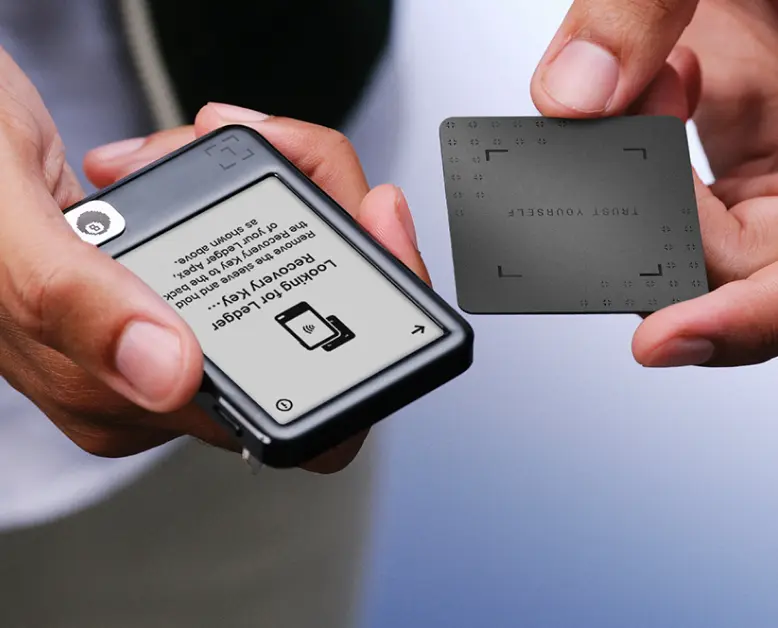
Ledger Nano Gen5 is the next-generation model from Ledger’s best-selling Nano series of signers. Like other next-gen Ledger signers, its E-Ink Secure Touchscreen is driven directly by its secure element chip. This allows you to rest assured your private keys stay safe and you can trust the details shown on the screen—giving you the same experience of Ledger’s flagship models at a pocket friendly price.
With an improved battery life, and USB-C, Bluetooth, and NFC compatibility, the Ledger Nano Gen 5 offers seamless connectivity and ease of use, letting you transact whenever and wherever you like.
It’s also highly customizable: you can showcase favorite images or NFTs on the bigger display, and even add exclusive badges designed by Macintosh GUI legend Susan Kare to express yourself freely.
Finally, the Ledger Nano Gen5 also comes with Ledger Recovery Key, a PIN-protected card that lets you create a private backup of your Secret Recovery Phrase directly from your signer.
| ข้อดี | ข้อเสีย |
| Secure Element Chip with CC EAL 6+ certification | No Wireless Qi charging |
| Secure E Ink Touchscreen driven directly by secure chip | |
| NFC, Bluetooth and USB-C compatibility | |
| หน้าจอล็อกแบบปรับแต่งได้ | |
| Compatible with recovery methods including Ledger Recovery Key and Ledger Recover | |
| Offers secure access to buying, selling, swapping & staking SOL and sol-based assets through Ledger Wallet |
Ledger Flex
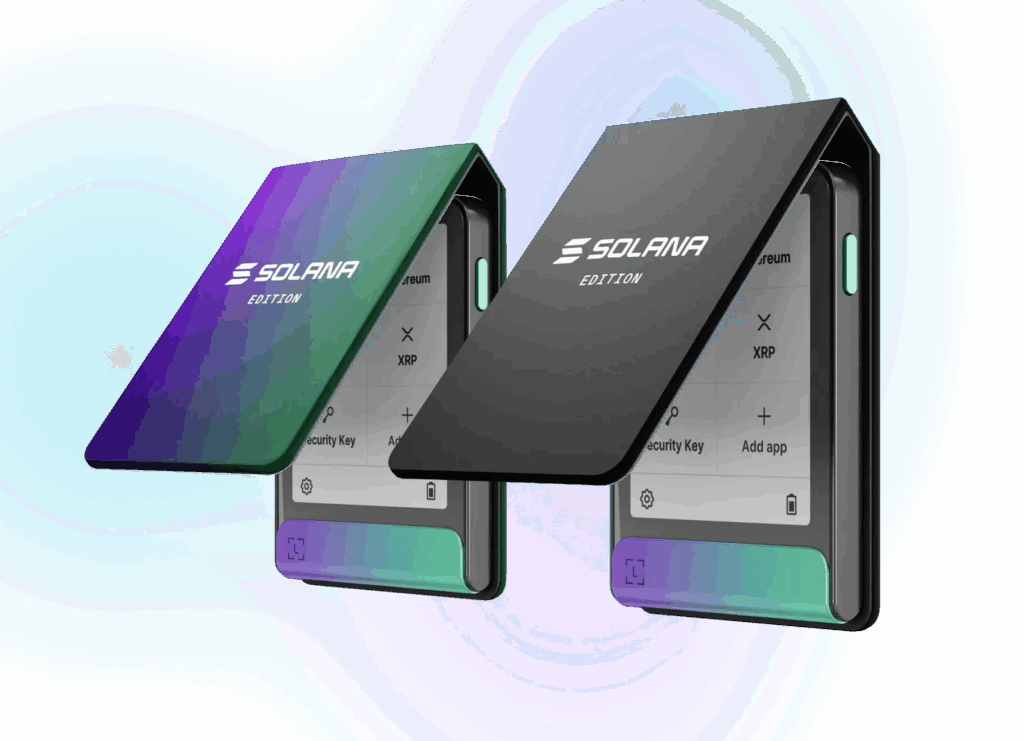
Ledger Flex is a signer built for everyday use, offering a perfect balance of security and usability at an attractive price point. เช่นเดียวกับอุปกรณ์ Ledger รุ่นอื่น ๆ Ledger Flex มาพร้อมชิป Secure Element ซึ่งจัดเก็บและรักษา Private Key ของคุณให้ปลอดภัยจากภัยคุกคามที่อาจเกิดขึ้น This secure element chip also drives its 2.8-inch Secure E Ink® touchscreen, offering an intuitive user interface while maintaining the same level of robust security found in other Ledger signers.
Ledger Flex มาพร้อมกับ NFC, USB-C, บลูทูธ และแบตเตอรี่ที่ใช้งานได้ถึง 10 ชั่วโมงต่อการชาร์จนั้น มอบการดูแลทรัพย์สินด้วยตนเองที่ปลอดภัยและสะดวกสบาย จึงเป็นตัวเลือกที่เหมาะในการจัดการ Solana และสินทรัพย์ดิจิทัลอื่น ๆ
There’s also a dedicated Ledger Flex Solana Edition. Each Solana edition Ledger Flex comes with a unique, non-transferable Soulbound Token (SBT) tied to the owner. This special SBT can be used to unlock targeted rewards, airdrops or other exclusive benefits offered by projects and partners across the Solana ecosystem in the future. More information here.
Of course, like all next-gen Ledger signers, it is also compatible with Ledger Recovery Key and Ledger Recover, offering a choice of solutions for seed phrase storage and account recovery.
| ข้อดี | ข้อเสีย |
| Secure Element Chip with CC EAL 6+ certification | No Wireless Qi charging |
| Secure E Ink Touchscreen driven directly by secure chip | |
| NFC, Bluetooth and USB-C compatibility | |
| หน้าจอล็อกแบบปรับแต่งได้ | |
| Compatible with recovery methods including Ledger Recovery Key and Ledger Recover | |
| Offers secure access to buying, selling, swapping & staking SOL and sol-based assets through Ledger Wallet |
Ledger Stax

Designed by Tony Fadell, the Godfather of the iPod, Ledger Stax is a revolutionary signer, offering the first-of-its-kind curved secure E Ink® touchscreen. With a Ledger Stax, you can customize the lock screen with any image or NFT of your choice, and even set the name on its spine. Not just that, but you can even ‘stack’ Ledger Stax signers together, thanks to its in-built magnets.
Like all Ledger signers, Ledger Stax uses a secure element chip to store private keys and drive its secure touchscreen. This means your private keys stay offline and hidden from both remote and physical hacks, and you can trust the details shown on its revolutionary E Ink touchscreen.
The Ledger Stax supports the Solana blockchain, including SOL, solana-based assets and over 15,000 cryptocurrencies. Plus, it integrates with Ledger Wallet for easy and secure asset management, staking, DeFi exploration, and a secure gateway to Solana apps and services.
And finally, Ledger Stax is also compatible with Ledger Recovery Key and Ledger Recover, giving you multiple options for seed phrase management and account recovery.
| ข้อดี | ข้อเสีย |
| Secure Element Chip with CC EAL 6+ certification | Comes at a more premium price point |
| Secure and premium curved E Ink Touchscreen driven directly by secure chip | |
| NFC, Bluetooth & USB-C compatibility, and wireless Qi charging | |
| Customizable lock screen and spine | |
| Compatible with recovery methods including Ledger Recovery Key and Ledger Recover | |
| Offers secure access to buying, selling, swapping & staking SOL and sol-based assets through Ledger Wallet |
Trezor Model T
The Trezor wallet, developed by Satoshi Labs, is a hardware wallet that supports Solana, as well as Bitcoin, Ethereum, and over 1,800 other cryptocurrencies. As a lower end Trezor model, it does not use a secure chip such as a Secure Element. This means that it leaves private keys potentially vulnerable to physical hacking.
It is supported by Trezor Suite, a platform for managing, buying, selling, and swapping crypto. It is designed primarily for core portfolio management, such as buying, selling, and transferring assets.
However, it does not include a built-in gateway for decentralized applications (dApps). To interact with Web3 protocols—such as NFT marketplaces or DeFi platforms—users must connect their device to third-party interfaces.
| ข้อดี | ข้อเสีย |
| Offers buying, selling, swapping SOL and sol-based assets through Trezor Suite | Does not offer a secure chip, potentially leaving private keys vulnerable |
| Color touchscreen | Its color touchscreen is not secure |
| Does not offer a secure gateway to solana apps and services. | |
| No Bluetooth or NFC connectivity or internal battery |
Trezor Safe 5
The current flagship Trezor hardware model is the Trezor Safe 5, which features a color touchscreen, haptic feedback and incorporates a Secure Element (EAL6+) chip.
While the screen is great for ease of use, letting you see each transaction clearly, it is not driven by its secure chip. Instead, the display is controlled by a general-purpose microcontroller (STM32). This means that while keys are protected at rest, the screen is vulnerable to spoofing, so you can’t fully trust the details it shows.
The Trezor Safe 5 also lacks Bluetooth connectivity and has no internal battery, meaning it must be physically tethered via USB to function—a significant friction point for mobile users.
Like the Trezor Model T, it is also supported by Trezor Suite, which allows for interacting with the Solana blockchain directly, however, it does not offer a secure connection to Solana apps and services.
| ข้อดี | ข้อเสีย |
| Secure Element Chip with CC EAL 6+ certification | Its color touchscreen is not secure, as it is driven by a hackable MCU chip |
| Color Touchscreen | No Bluetooth connectivity or internal battery |
| Offers buying, selling, swapping SOL and sol-based assets through Trezor Suite | Does not offer a secure gateway to solana apps and services. |
Safepal S1
Established in 2018, SafePal is Binance Labs’ first hardware wallet. The hardware wallet, SafePal S1, features a secure chip with EAL6+ certification and a self-destruct mechanism to protect against unauthorized access.
Safepal’s S1 Pro is a card-shaped device with a small screen driven by an MCU chip. Its ‘air-gapped QR system’ removes USB and Bluetooth connectivity entirely, but it also adds friction, so even simple transactions require scanning several QR codes back and forth between the device and the phone.
On the software side, the SafePal App is designed around active trading rather than pure cold storage. It integrates tightly with Binance and multiple DeFi protocols, placing swaps, charts and dApps prominently in the interface.
Although SafePal supports SOL, SPL tokens and Solana NFTs, interacting with Solana apps generally requires going through the SafePal App rather than reviewing instructions clearly on the device screen. SafePal forces you to verify complex Solana transactions on your phone app, not the secure device—meaning you must trust a potentially compromised screen for displaying transaction details.
| ข้อดี | ข้อเสีย |
| Secure Element Chip with CC EAL 6+ certification | Does not offer a secure screen, as the display is driven by a hackable MCU chip |
| Offers buying, selling, swapping SOL and sol-based assets through SafePal app | No Bluetooth or USB-C compatibility |
| Relies on blind signing, since it displays transaction details only on your internet-connected device |
Tangem
The Tangem Wallet is a seedless wallet in essence, although it has released a new 2.0 model offering a seed phrase for backup. But as a hardware wallet, it also supports SOL and Sol-based assets, as well as over 13,000 cryptocurrencies across 75 networks.
When it comes to ease of use, it does offer simplicity, with a card-shaped design and NFC capabilities. Plus, users can buy, sell, swap and stake SOL directly within the Tangem app. That said, interacting with the broader Solana ecosystem (like Jupiter, Raydium, or Pump.fun) is cumbersome. Tangem does not support direct browser extension integration (like Phantom or Solflare); instead, you must rely on WalletConnect, which is often slower, frequently disconnects, and is less compatible with the fast-paced nature of Solana DeFi.
Tangem’s simplicity also comes with a critical security trade-off: the device has no screen. This means you are forced to trust your phone’s display entirely. If your phone is compromised by malware, it could display a legitimate transaction while secretly instructing the card to sign a malicious one. This means you are permanently blind signing; you must trust the transaction is legitimate and have no way to check.
As mentioned, the new “2.0” cards allow for a seed phrase backup,however, the default setup remains “seedless,” meaning if you lose your physical cards, your assets are unrecoverable.
| ข้อดี | ข้อเสีย |
| Secure Chip for storing private keys | Does not offer a screen for verifying transaction details securely |
| Offers buying, selling, swapping and staking SOL and sol-based assets through Tangem app | Accessing DeFi apps is clunky, with no native options for connection. |
| Relies on blind signing, since it displays transaction details only on your internet-connected device | |
| Backup and recovery is complicated, especially with the default setup |
การเปรียบเทียบ Hardware Wallet ทั้งหมดที่รองรับ Solana
| Solana Hardware Wallet | Self-custody | ชิป Secure Element | Private key generated in SecureElement chip | จอแสดงผล | หน้าจอ/หน้าจอสัมผัสที่ควบคุมด้วยชิป Secure Element | การดำเนินการที่มีการเข้ารหัส ซึ่งดำเนินการโดยชิป Secure Element | ราคา |
| Ledger Flex | ✅ มี | ✅ มี | ✅ มี | ✅ มี | ✅ มี | ✅ มี | 249 USD |
| Ledger Nano S Plus | ✅ มี | ✅ มี | ✅ มี | ✅ มี | ✅ มี | ✅ มี | 79 USD |
| Ledger Nano X | ✅ มี | ✅ มี | ✅ มี | ✅ มี | ✅ มี | ✅ มี | 149 USD |
| Ledger Stax | ✅ มี | ✅ มี | ✅ มี | ✅ มี | ✅ มี | ✅ มี | 399 USD |
| Trezor Model T | ✅ มี | ❌ ไม่มี | ❌ ไม่มี | ✅ มี | ❌ ไม่มี | ❌ ไม่มี | 149 USD |
| Trezor Safe 5 | ✅ มี | ✅ มี | ❌ ไม่มี | ✅ มี | ❌ ไม่มี | ❌ ไม่มี | $169 |
| Safepal S1 | ✅ มี | ✅ มี | ❌ ไม่มี | ✅ มี | ❌ ไม่มี | ❌ ไม่มี | 49.99 USD |
| Tangem | ✅ มี | ✅ มี | ✅ มี | ❌ ไม่มี | ❌ ไม่มี | ❌ ไม่มี | 69.90 USD |
How to choose the best solana software wallet
When it comes to choosing the best solana software wallet, the approach to security and ease of use is slightly different.
That’s because, by nature, solana software wallets are not secure when used alone. While they do offer ownership, allowing you to manage your private keys yourself, they store those private keys locally on your internet connected device, such as a laptop or smartphone. Unfortunately, this leaves them vulnerable to remote attacks. If your internet-connected device is infected with malware: game over! The hacker can easily access the private keys attached to the solana software wallet and access your solana-based assets.
That’s why when assessing a software wallet for its security features, the most important thing to take into account is its compatibility with hardware wallets, such as Ledger signers.
Then of course, the best solana software wallets also let you interact with the entire solana ecosystem, so you can buy, sell, swap and stake SOL, as well as interact with solana apps and services with ease.
Solana Software Wallet ที่ดีที่สุด
So now you know what features make the best solana software wallets, let’s look at some of the most popular options and how they compare:
Phantom Wallet
Phantom is built for fast, smooth dapp use with NFT support and simple native SOL staking. It is a popular choice for Solana users due to its ease of use and seamless integration with dApps. คุณสามารถสเตคโทเคน โต้ตอบกับ DApp ที่อยู่บนเครือข่าย Solana และจัดการ NFT ได้ในแอปเดียว Plus, Phantom’s browser extension is user-friendly and also supports Ethereum and Polygon, making it a versatile multi-chain option for users looking to fulfill this use case.
By combining Phantom with Ledger signers, users benefit from the convenience of a hot wallet while ensuring that their private keys remain secure offline and safeguarded from online threats. With added features like token swapping and built-in staking rewards, it’s a comprehensive software wallet for those diving into the Solana ecosystem.
| ข้อดี | ข้อเสีย |
| Compatible with Ledger signers | Stores private keys on your internet-connected device if used alone |
| Offers in-built staking, swapping, on-ramping | |
| Offers browser extension and mobile app (iOS and Android) | |
| Supports Solana, Ethereum, Polygon, Bitcoin, Base, Sui, and Monad |
Solflare Wallet
Solflare is a Solana-first specialist that’s especially strong for staking, validator control, and deeper Solana ecosystem features. Unlike broader multi-chain wallets like Phantom, Solflare delivers a specialized experience for Solana users. มาพร้อมกับแอปมือถือสำหรับทั้งระบบ Android และ iOS ที่ใช้จัดการคริปโตได้ทุกที่ทุกเวลา
Solflare มีการเชื่อมต่อกับอุปกรณ์ Ledger อย่างไร้รอยต่อ ซึ่งจะมอบประสบการณ์ที่ดีที่สุดจากทั้งสองฝั่งให้กับผู้ใช้ นั่นก็คืออินเทอร์เฟซที่ใช้งานง่ายสำหรับการทำธุรกรรมประจำวัน การสเตค และการจัดการ NFT ของ Solflare ควบคู่กับความปลอดภัยของการจัดเก็บ Private Key แบบออฟไลน์ของ Ledger การตั้งค่านี้ช่วยให้ผู้ใช้ได้รับความยืดหยุ่นจาก Hot Wallet พร้อมรับความปลอดภัยที่แน่นหนาของระบบจัดเก็บแบบ Cold Storage ซึ่งทำให้ Solflare เป็นตัวเลือกที่ยอดเยี่ยมสำหรับผู้ที่ต้องการจัดการสินทรัพย์ Solana อย่างปลอดภัยและมีประสิทธิภาพ
| ข้อดี | ข้อเสีย |
| Compatible with Ledger signers | Stores private keys on your internet-connected device if used alone |
| Offers in-built staking, swapping, on-ramping | |
| Offers browser extension and mobile app (iOS and Android) | |
| Supports Solana, Ethereum, Polygon, Bitcoin, Base, Sui, and more |
Backpack Wallet
Backpack Wallet เป็นวอลเล็ตแบบดูแลสินทรัพย์ด้วยตนเองที่เน้นความปลอดภัย ออกแบบมาสำหรับแอปพลิเคชัน Web3 เจเนอเรชันถัดไป เริ่มแรก Backpack พัฒนาขึ้นสำหรับระบบนิเวศของ Solana แต่ปัจจุบันได้พัฒนาเป็นวอลเล็ตของสัญญาอัจฉริยะที่ทรงพลัง และเป็นประตูสู่ระบบนิเวศของ Backpack ที่รองรับทั้ง Ethereum, Optimism, Arbitrum, Polygon, Base และบล็อกเชนอื่น ๆ
Backpack Wallet เป็นศูนย์รวมสำหรับทุกความต้องการด้านคริปโต ช่วยให้คุณสามารถสำรวจดู DeFi สเตคสินทรัพย์ จัดการ NFT และเชื่อมต่อกับ dApp ข้ามระบบล็อกเชนของบล็อกเชนได้อย่างราบรื่น Backpack ซึ่งออกแบบโดยคำนึงถึงความปลอดภัยเป็นหลัก ช่วยให้คุณทำธุรกรรมได้อย่างรวดเร็ว ปลอดภัย และคุ้มค่า ผ่านอินเทอร์เฟซเดียวที่ใช้งานง่ายและไร้รอยต่อ Backpack สามารถใช้งานได้ทั้งบนเดสก์ท็อปและมือถือ จึงสามารถมอบประสบการณ์การใช้งานที่ราบรื่นต่อเนื่องบนทุกอุปกรณ์
Backpack also integrates with Ledger signers, so you can keep the security and convenience of Ledger’s ecosystem while approving transactions securely on your signer.
| ข้อดี | ข้อเสีย |
| Compatible with Ledger signers | Stores private keys on your internet-connected device if used alone |
| Offers in-built staking & swapping | Does not offer options to onramp (buy SOL with fiat currencies) |
| Offers browser extension and mobile app (iOS and Android) | |
| Supports Solana, Ethereum and several EVM/SVM networks |
Glow
Glow is a pure Solana-native hot wallet, focused on everyday Solana use, with built-in SOL staking, zero-fee swaps, and NFT browsing tools in both mobile app and browser extension form.
It offers a streamlined experience with innovative features like the Token Burner feature, which permanently removes unwanted spam or scam tokens from your wallet. This neutralizes dusting attacks, where scammers airdrop worthless tokens to trick you into malicious transactions, while recovering small amounts of SOL that would otherwise be wasted, keeping your wallet clean and secure. Its transaction simulation feature also helps you detect malicious activity before signing.
Glow syncs across desktop and mobile, letting you manage SOL assets on-the-go. While it is open-source and prioritizes simplicity with biometric authentication, it also integrates with Ledger signers for enhanced security, giving you the best of both worlds.
| ข้อดี | ข้อเสีย |
| Compatible with Ledger signers | Stores private keys on your internet-connected device if used alone |
| Zero-fee swaps, built-in staking, and NFT tools | Solana-focused only, limited multi-chain support |
| Spam token burner and transaction simulation for security |
Exodus Wallet
Exodus Wallet เป็นวอลเล็ตรองรับหลายสกุล มาพร้อมอินเทอร์เฟซที่ใช้งานง่าย รองรับ Solana (SOL), โทเคน SPL, NFT และฟีเจอร์ DeFi ต่าง ๆ รวมถึงการสเตคกิ้ง SOL และการสวอปโทเคน วอลเล็ตนี้มีบริการสนับสนุนตลอด 24 ชั่วโมงทุกวัน และมีระบบแลกเปลี่ยนที่ครอบคลุม ปัจจุบัน Exodus ยังไม่รองรับการยืนยันตัวตนแบบสองขั้นตอน (2FA) และฟังก์ชันการใช้งานแบบ Multi-Signature
เมื่อเดือนกันยายน 2024 ที่ผ่านมา Exodus ได้ผสาน XO Swap เข้ากับ แอป Ledger Wallet ทำให้ผู้ใช้ Ledger สามารถสวอปคู่คริปโตนับพันรายการได้อย่างปลอดภัยจาก Signer ของตนโดยตรง ความร่วมมือครั้งนี้มีเป้าหมายเพื่อยกระดับการควบคุมและความปลอดภัยในการจัดการคริปโตของผู้ใช้ ช่วยให้ทั้งผู้ใช้ทั้งเก่าและใหม่ สามารถสวอปสินทรัพย์ได้อย่างมั่นใจ
| ข้อดี | ข้อเสีย |
| Offers swapping and staking | Stores private keys on your internet-connected device if used alone |
| Supports SPL tokens and NFTs | Not compatible with Ledger signers |
| Lacks multisig and 2FA |
Atomic Wallet
Atomic Wallet is a software wallet that supports 1,000 cryptocurrencies, including Solana (SOL), Ethereum, and Bitcoin. มาพร้อมอินเทอร์เฟซที่ใช้งานง่าย พร้อมฟีเจอร์ต่าง ๆ เช่น สามารถทำการสเตคกิ้งในแอป การจัดการพอร์ตโฟลิโอ และการสวอปโทเคนผ่าน ChangeNow โดยผู้ใช้จะสามารถควบคุม Private Key ของตนเองซึ่งปกป้องด้วยวลีกู้คืน 12 คำได้
นอกจากนี้ แม้ว่า Atomic Wallet จะรองรับการซื้อคริปโตด้วยเงินสกุลต่าง ๆ แต่การทำธุรกรรมผ่านพาร์ทเนอร์อย่าง Simplex อาจมีค่าธรรมเนียมที่สูงกว่า ฟีเจอร์ความปลอดภัยประกอบด้วย การป้องกันด้วยรหัสผ่านและ PIN แต่ยังไม่รองรับ Multi-Signature และการยืนยันตัวตนแบบสองขั้นตอน (2FA) ผลตอบแทนจากการสเตคจะอยู่ระหว่าง 5% – 22% ซึ่งดึงดูดผู้ใช้ที่ต้องการเพิ่มมูลค่าสินทรัพย์คริปโตแต่ยังต้องการเป็นผู้ควบคุมสินทรัพย์ด้วยตนเอง
| ข้อดี | ข้อเสีย |
| Offers in-built staking, buying and swapping | Stores private keys on your internet-connected device if used alone |
| อินเทอร์เฟซที่เป็นมิตรกับผู้ใช้ | Not compatible with Ledger signers |
| Only uses a 12 word seed phrase, which is not as secure as 24 words | |
| Lacks multisig and 2FA |
การเปรียบเทียบ Solana Software Wallet
| Solana Wallet | การดูแลสินทรัพย์ด้วยตนเอง | สเตคกิ้ง | สวอป | ซื้อ | Compatible with Ledger signer | อินเทอร์เฟซ | เครือข่ายและโทเคนอื่น ๆ ที่รองรับ |
| Phantom Wallet | มี ✅ | มี ✅ | มี ✅ | มี ✅ | มี ✅ | ส่วนขยายเบราว์เซอร์, มือถือ | Solana, Ethereum, Polygon, Base, Bitcoin, Sui, Monad, and HyperEVM |
| Solflare Wallet | มี ✅ | มี ✅ | มี ✅ | มี ✅ | มี ✅ | ส่วนขยายเบราว์เซอร์, มือถือ | Multichain / cross-chain capable |
| Backpack Wallet | มี ✅ | มี ✅ | มี ✅ | มี ✅ | มี ✅ | ใช้ได้ทั้งบนเดสก์ท็อปและมือถือ | Ethereum, Optimism, Arbitrum, Polygon, Base และบล็อกเชนอื่น ๆ |
| Glow | มี ✅ | มี ✅ | มี ✅ | มี ✅ | มี ✅ | ส่วนขยายเบราว์เซอร์, มือถือ | Solana only |
| MetaMask (Solflare Snap) Wallet | มี ✅ | จำกัด | มี ✅ | ไม่มี ❌ | ผ่าน MetaMask Snaps | ส่วนขยายเบราว์เซอร์, มือถือ | Ethereum, Solana |
| Exodus Wallet | มี ✅ | มี ✅ | มี ✅ | มี ✅ | ไม่มี ❌ | เดสก์ท็อป, มือถือ | รองรับคริปโตกว่า 200 สกุล |
| Atomic Wallet | มี ✅ | มี ✅ | มี ✅ | มี ✅ | ไม่มี ❌ | เดสก์ท็อป, มือถือ | รองรับคริปโตหลายพันสกุล |
Why Ledger signers offer the best experience as Solana wallets
In over a decade, Ledger has perfected a security DNA that has ensured no Ledger signer has ever been hacked. With over 8 million signers in use, let’s take a look at why Ledger is your go-to solution when choosing the best Solana wallet.
Ledger’s Security Model
All Ledger signers come with a foundational security model;
- a Secure Element chip certified as CC EAL5+ (or higher) to store your keys offline; protected from remote and physical hacks.
- A secure screen, driven directly by the secure element chip so you can trust the details it shows.
- A 6-8 digit PIN code; so no one can access your signer even if it falls into the wrong hands
- Ledger OS; a secure OS that keeps your apps separate and information secure
- Rigorous battle-testing from internal white-hat hacker lab, Ledger Donjon.
- The option to Clear sign; translating transaction hashes into human readable data so you know what you’re agreeing to before you sign.
- Genuine Ledger check built into Ledger Wallet and the signer itself — so you can instantly verify your device is authentic.
- The option to add a Passphrase, a secret password only you know — so even if someone steals your 24-word seed phrase, they only see a decoy wallet
Ledger Wallet: Offering secure and seamless ease of use
Every Ledger signer also benefits from Ledger Wallet™, the all-in-one crypto app giving you the power to buy, sell, swap, stake, and track your SOL and solana assets in one place.
Ledger Wallet fully supports viewing and managing Solana-based tokens (SPL tokens like USDC, BONK, Pengu, and more) directly within the app. Users can seamlessly add, view, and manage their SPL tokens alongside their SOL holdings. ฟีเจอร์นี้มีให้ใช้งานในแอป Ledger Wallet ทั้งบนมือถือและเดสก์ท็อป เพื่อประสบการณ์การใช้งานที่ราบรื่นโดยไม่จำเป็นต้องพึ่งวอลเล็ตจากบุคคลที่สามสำหรับการจัดการโทเคนขั้นพื้นฐาน
Not only that, but Ledger Wallet also offers a secure gateway to Solana apps and services, meaning you can access marketplaces like Magic Eden or DEXs for swapping assets with security and ease. And of course, it’s not just for Solana, since it supports over 15,000+ coins and tokens.
Backup and Recovery Options
For extra peace of mind beyond your 24-word seed phrase, Ledger offers recovery options beyond the Recovery Sheets included with your purchase, including:
- Ledger Recover (optional, paid subscription): your signer encrypts and fragments your entropy into three shards distributed among three backup providers— only you can restore it after identity verification.
- Ledger Recovery Key (one-time purchase): a PIN-protected NFC card with its own Secure Element that holds an encrypted backup of your 24 words; tap it to any touchscreen Ledger signer to restore instantly.
- Seed phrase backup accessories, such as the Billfodl and steel capsule available in the Ledger shop, help users create fire-proof, waterproof backups of their seed phrases.
บทสรุป
Picking the best Solana wallet in 2026 boils down to your security needs versus how you want to play in the ecosystem. Hardware wallets offer top-tier security, keeping your keys offline and safe like a digital vault. They’re perfect for the security-conscious.
วิธีที่ปลอดภัยที่สุดคือการซื้อ Hardware Wallet อย่าง Ledger เพื่อใช้สร้างและเก็บ Private Key ของคุณให้ปลอดภัยแบบออฟไลน์ จากนั้นจึงเชื่อมต่อกับ Software Wallet เมื่อจำเป็น
Remember, you’re in charge here. Solana Wallet ที่คุณเลือกคือประตูสู่จักรวาลของ Solana Choose wisely, keep those keys secure, and enjoy the ride through Solana’s fast, low-fee blockchain.
คำถามที่พบบ่อยเกี่ยวกับ Solana Wallet
Solana Wallet มีกี่ประเภท?
Solana wallets basically come in two types: the software kind, or “hot wallets,” like Phantom and Solflare—apps or browser add-ons where your private keys are online, making them super handy but a bit risky if you’re not careful.
Then, there’s the hardware type, or “cold wallets,” like Ledger and Trezor. วอลเล็ตประเภทนี้เป็นอุปกรณ์จริงที่เก็บ Private Key ของคุณไว้แบบออฟไลน์ ซึ่งเป็นการเพิ่มความปลอดภัยในการป้องกันการโจมตีจากแฮกเกอร์ขึ้นไปอีกขั้น
Solana Wallet ทำงานอย่างไร?
เช่นเดียวกับวอลเล็ตคริปโตอื่น ๆ วอลเล็ตสำหรับ Solana จะทำหน้าที่เป็นที่จัดเก็บ Private Key ของคุณแบบดิจิทัล ซึ่งจำเป็นสำหรับการเข้าถึง ส่ง และรับ SOL รวมถึงสินทรัพย์ต่าง ๆ บนเครือข่าย Solana (SPL Token) แม้อาจมีความแตกต่างบางประการระหว่าง Solona Wallet กับวอลเล็ตคริปโตอื่นที่รองรับบล็อกเชนต่างกัน แต่วอลเล็ตเหล่านี้ก็มีจุดประสงค์เดียวกันก็คือใช้เพื่อเข้าถึงและจัดการสินทรัพย์ดิจิทัลของคุณ
Solana Wallet ไม่ได้ทำการจัดเก็บโทเคนไว้ในอุปกรณ์ แต่จะเก็บกุญแจเข้ารหัส (Private Key) ซึ่งใช้ในการอนุมัติธุรกรรมบนบล็อกเชน Solana Solana Wallet ยังช่วยให้คุณสามารถโต้ตอบกับแอปพลิเคชันแบบกระจายอำนาจ (dApp) บนเครือข่าย Solana จึงถือเป็นเครื่องมือสำคัญในการจัดการสินทรัพย์ที่อยู่บน Solana
ฉันจำเป็นต้องมี Solana Wallet หรือไม่?
จำเป็น! หากคุณวางแผนที่จะถือครอง ส่ง หรือใช้งาน Solana (SOL) หรือสินทรัพย์ดิจิทัลอื่น ๆ บนบล็อกเชน Solana คุณจะต้องมีวอลเล็ตที่รองรับ Solana เพื่อจัดการเงินทุนของคุณ Solana Wallet ยังเปิดโอกาสให้คุณเข้าสู่ระบบนิเวศของ Solana เพื่อใช้งานต่าง ๆ ได้หลากหลาย ไม่ว่าจะเป็นฟีเจอร์การสเตคกิ้ง SOL, การเงินแบบไม่มีตัวกลาง (DeFi) และ NFT เพื่อความปลอดภัยที่มากขึ้น แนะนำให้ใช้ Solana Wallet แบบ Self-Custody เพื่อให้คุณสามารถควบคุม Private Key ได้อย่างเต็มที่
Solana Wallet รุ่นไหนดีที่สุด?
การตัดสินว่า Solana Wallet แบบไหนดีที่สุดนั้นขึ้นอยู่กับความต้องการของคุณ Phantom และ Solflare เป็น Software Wallet ที่ผสานการทำงานกับ dApp และ NFT ซึ่งใช้งานง่าย เพื่อความปลอดภัยที่มากขึ้น อุปกรณ์ลงนามอย่าง Ledger ให้คุณสามารถเก็บ Private Key แบบออฟไลน์ได้ ซึ่งโดยทั่วไปถือว่าปลอดภัยกว่าสำหรับการถือครองในระยะยาว หากคุณมองหา Solana Wallet ที่ผสมผสานทั้งความยืดหยุ่นและความปลอดภัย ลองพิจารณาซื้ออุปกรณ์ลงนามอย่าง Ledger เพื่อใช้สร้างและเก็บ Private Key แบบออฟไลน์ และเชื่อมต่ออุปกรณ์ลงนามของคุณกับ Software Wallet
การสร้าง Solana Wallet มีวิธีอย่างไร?
การสร้าง Solana Wallet นั้นไม่มีอะไรซับซ้อน สำหรับ Software Wallet อย่าง Phantom สามารถเริ่มต้นโดยดาวน์โหลดส่วนขยายของวอลเล็ตหรือแอป จากนั้นทำตามขั้นตอนการตั้งค่าเพื่อสร้างวอลเล็ตใหม่ และอย่าลืมเก็บวลีกู้คืนของคุณให้ปลอดภัย เพราะสิ่งนี้จำเป็นในการเข้าถึงเงินทุนของคุณ หากคุณลืมรหัสผ่าน เมื่อการตั้งค่าเสร็จสิ้น คุณสามารถเริ่มซื้อ SOL และสำรวจ dApp ที่อยู่บนเครือข่าย Solana ได้ทันที
สำหรับ Hardware Wallet อย่าง Ledger ให้ทำการตั้งค่าตามคำแนะนำที่ให้มาหลังทำการซื้อ จากนั้นติดตั้งแอป Solana บนอุปกรณ์ลงนาม Ledger ผ่านทางแอป Ledger Wallet ขั้นสุดท้าย ให้สร้าง Solana Address และเชื่อมกับอุปกรณ์ Ledger ของคุณ เพื่อให้สามารถจัดเก็บสินทรัพย์ของคุณแบบออฟไลน์ได้อย่างปลอดภัย
การเพิ่ม SPL Token ในบัญชี Solana ของ Ledger สามารถทำได้อย่างไร?
แม้ว่า แอป Ledger Wallet จะให้การสนับสนุน Solana SPL Token ซึ่งทำให้สามารถจัดการโทเคนยอดนิยมเช่น USDC และ BONK ได้โดยตรง แต่ SPL Token อื่น ๆ ยังต้องใช้วอลเล็ตของบุคคลที่สามจึงจะใช้งานได้เต็มรูปแบบ
เพื่อจัดการโทเคนที่ไม่ได้รับการสนับสนุนเหล่านี้อย่างปลอดภัย โปรดเชื่อมต่อ Ledger ของคุณเข้ากับวอลเล็ตที่เข้ากันได้ เช่น Solflare, Phantom หรือ Backpack ทำตามคำแนะนำใน บทความสนับสนุน Solana SPL ของแอป Ledger Wallet เพื่อเชื่อมต่อกับ Ledger ของคุณ และยืนยันการเชื่อมต่อบนอุปกรณ์ลงนาม เพื่อส่งโทเคน SPL หรือโต้ตอบกับแอปพลิเคชันแบบกระจายอำนาจ (dApps) คุณจะต้องเปิดใช้งาน Blind Signing ในการตั้งค่าแอป Solana ใน Ledger ของคุณ เนื่องจากแอป Ledger Wallet กำลังขยายการรองรับโทเคนอย่างต่อเนื่อง โปรดตรวจสอบว่าคุณจัดการโทเคน SPL เฉพาะของคุณได้โดยตรงใน แอป Ledger Wallet หรือไม่ ก่อนการใช้วอลเล็ตของบุคคลที่สามเพราะวิธีนี้จะปรับปรุงประสิทธิภาพของกระบวนการได้
Which Solana wallet is best for staking?
Ledger is the best Solana wallet for staking with maximum security. You can delegate SOL directly in Ledger Wallet while keeping full custody of your coins and private keys at every stage, with every staking action approved on your Ledger signer. You also get trusted validator options and a built-in Earn dashboard to track SOL rewards.
Which wallet is best for NFTs?
Ledger signers allow you to do more than just manage your NFTs via Ledger Wallet. Our touchscreen signers can also display your NFT on screen to
How do I integrate my hardware wallet with a software wallet?
You connect your Ledger to a Solana hot wallet (like Phantom, Solflare, or Backpack) through the signer’s “Connect hardware wallet / Ledger” option, then confirm every transaction on the Ledger signer. This way the software wallet handles the interface, but your private keys stay offline on your signer.
Is there an official Solana wallet?
No, Solana doesn’t have a single “official” wallet endorsed as the default; instead it supports a broad ecosystem of hardware signers and software wallets.
เราได้พูดถึงทุกเรื่องเกี่ยวกับโทเคน SPL และความเชื่อมโยงกับประสบการณ์การใช้ Ledger ของคุณไปแล้ว สำหรับข้อมูลเพิ่มเติมเกี่ยวกับวิธีเทรดโทเคน SPL บนแอป Ledger Wallet คุณสามารถดูบทความสนับสนุนได้ ที่นี่
การเปลี่ยนแปลง: จาก Hardware Wallet สู่ Ledger Signer
คริปโตอาจเริ่มต้นจากการทดลองที่กล้าหาญ แต่การนำไปใช้ก็เพิ่มมากขึ้นเมื่อเทคโนโลยีและประสบการณ์ของผู้ใช้พัฒนาอย่างรวดเร็ว อย่างไรก็ตาม ภาษาที่ใช้ในการอธิบายมันยังคงติดอยู่ในช่วงเริ่มต้น
We called our devices “hardware wallets,” mislabelling the role of secure hardware, and obfuscating the role of software (Ledger Live). ระหว่างทาง ผู้ใช้งานถูกทิ้งไว้เบื้องหลัง
หลายคนยังคงเชื่อว่า:
- สินทรัพย์นั้นถูกจัดเก็บไว้ในอุปกรณ์ (ซึ่งไม่ใช่โดยที่จริง ๆ แล้วไม่ใช่)
- นั่นหมายถึงว่าหากคุณทำอุปกรณ์หาย คุณก็จะสูญเสียสินทรัพย์ไปด้วย (แต่จริง ๆ แล้วคุณจะไม่สูญเสียสินทรัพย์)
- และถ้าอุปกรณ์หาย สินทรัพย์ก็หายตาม (ไม่ใช่)
- วลีกู้คืน 24 คำนั้นเคยเป็นภาระที่มีเพียงผู้ใช้ที่เชี่ยวชาญด้านเทคโนโลยีเท่านั้นที่สามารถจัดการได้ (ซึ่งไม่เป็นความจริงอีกต่อไปแล้ว)
สิ่งเหล่านี้มีมากกว่าความเข้าใจผิด แต่คือ อุปสรรคต่อการใช้งานจริง So at Ledger, we believe that clarity is essential for the next stage of adoption
เรากำลังเปลี่ยนแปลงวิธีที่เราพูดถึงผลิตภัณฑ์ของเรา และด้วยการทำเช่นนั้น เรากำลังเปลี่ยนแปลงวิธีที่ผู้คนเข้าใจถึงการเป็นเจ้าของสินทรัพย์ดิจิทัลเอง
Hardware wallet → signers
อุปกรณ์ Ledger ไม่ได้จัดเก็บสินทรัพย์ แต่ยังลงนามในธุรกรรม พิสูจน์เจตนา ยืนยันตัวตน พวกมันไม่ใช่ Vaults แต่เป็นสะพานเชื่อมที่ปลอดภัยระหว่างตัวตนของคุณกับสิ่งที่คุณทำออนไลน์ ไม่ได้แค่ถือคีย์ไว้ แต่ช่วยให้คุณเชื่อมั่นในตัวเอง
We call them signers now, because that’s what they truly are.
In a world where AI grows more powerful every day, proof of humanity matters more than ever. อุปกรณ์ลงนามเป็นมากกว่าอุปกรณ์รักษาความปลอดภัย มันคือหลักฐานที่มีการเข้ารหัสที่ยืนยันตัวตนของคุณ มันให้รากฐานที่มั่นคงแก่คุณในการเป็นเจ้าของ อนุญาต และปกป้อง Digital Life ของคุณโดยไม่ต้องพึ่งพาใคร From sending a transaction to signing a contract or verifying your credentials, your signer ensures you, and only, can provide digital consent – proof of you.Together, signer and Ledger Wallet redefine what digital ownership looks like, clear, secure, and free from compromise.
