






Product, Thought leadership | 04/13/2026
Ledger Wallet 4.0: Redesigning the Home Tab Around What Matters
This is the first post in a series going behind the scenes of how we’re rebuilding Ledger Wallet 4.0 around those things users told us they care most about.
Before You Dive In:
- We rebuilt the Home Tab around the two things users told us they care about most – their balance and the market.
- This post covers how we rethought the information hierarchy, tackled the cross-chain asset challenge, revamped token search, and why we moved analytics to a dedicated page.
When we started designing the new Ledger Wallet 4.0 Home Tab, we asked ourselves the simplest possible question: what does a user actually need to see when they open the app?
We talked to users. The answer was always the same two things: my balance and how is the market doing?
It sounds obvious in hindsight. But the previous home screen had evolved organically over time – features layered on top of features – and the core information had gotten buried under complexity. So we went back to basics and rebuilt the information hierarchy from the ground up. This is the first post in a series going behind the scenes of how we’re rebuilding Ledger Wallet 4.0.
Balance First, Everything Else Second
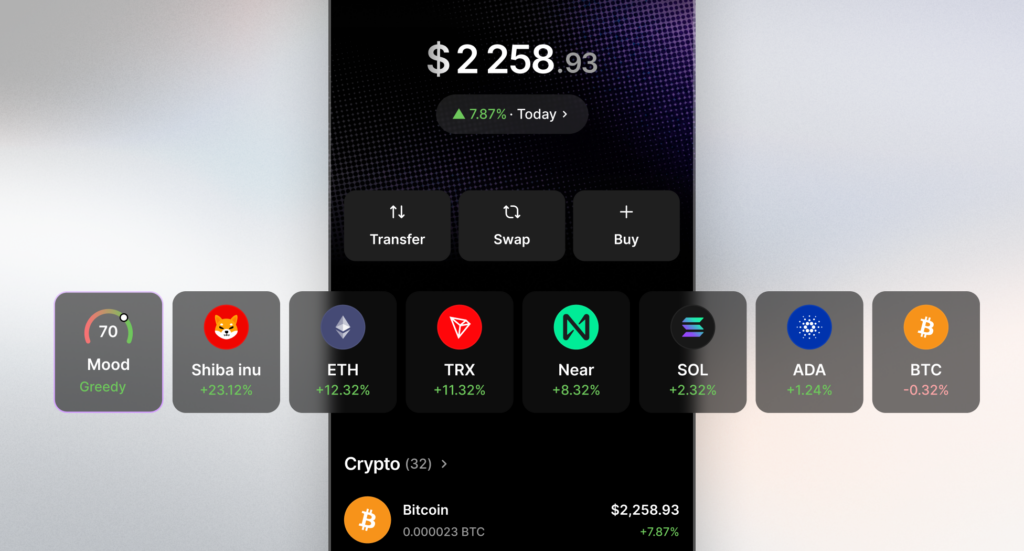
A big, bold balance front and center – unmistakable the moment you open the app – with a clearer refresh indicator so you always know you’re looking at current data. We also added a tap-to-hide balance for when you’re checking your app in public. Then a quick market glance: the Fear/Greed index to read the room, a few trending tokens, and direct access to your asset list.
This sounds simple, but getting the density right took real iteration. Too sparse and you’re wasting screen real estate. Too dense and you’re back to the cluttered experience we were trying to fix. The goal was a home screen that feels both complete and calm – you get what you need without feeling overwhelmed.
The Cross-Chain Asset Challenge
The asset list itself was one of the most interesting product challenges in this redesign. Ledger Wallet is a cross-chain wallet, and the multi-chain world creates a UX problem that most wallets still haven’t solved well.
Take USDC. A single user might hold USDC across Ethereum, Base, Arbitrum, and Solana. Most users want to see one consolidated USDC balance – they think in terms of “how much USDC do I have,” not “how much USDC do I have on each chain.” But they still need the flexibility to drill down one level and see exactly which network their USDC sits on when it’s time to send or swap.
We built for both: a consolidated view by default, with the detail one tap away. And we’re continuing to push this further to better organize the different asset classes you can hold – crypto, stablecoins, tokenized stocks, and whatever comes next.
Digital private property is a fundamental right—but it’s always come with a catch.
— Guillaume Mathias (@gm4thi4s) April 3, 2026
For too long, the industry forced a false choice: absolute safety or effortless use. A fortress, or a smooth experience. Never both.
With Ledger Wallet 4.0, that tension ends. 🧵 pic.twitter.com/5i85oUHnlK
Rethinking Token Search
Last year we also fully revamped how you search and select tokens. If you’ve spent any time in web3, you know this is one of the ecosystem’s most persistent UX pain points. Picking the wrong token or the wrong network is a mistake that can cost real money – and the old patterns made it too easy to slip up.
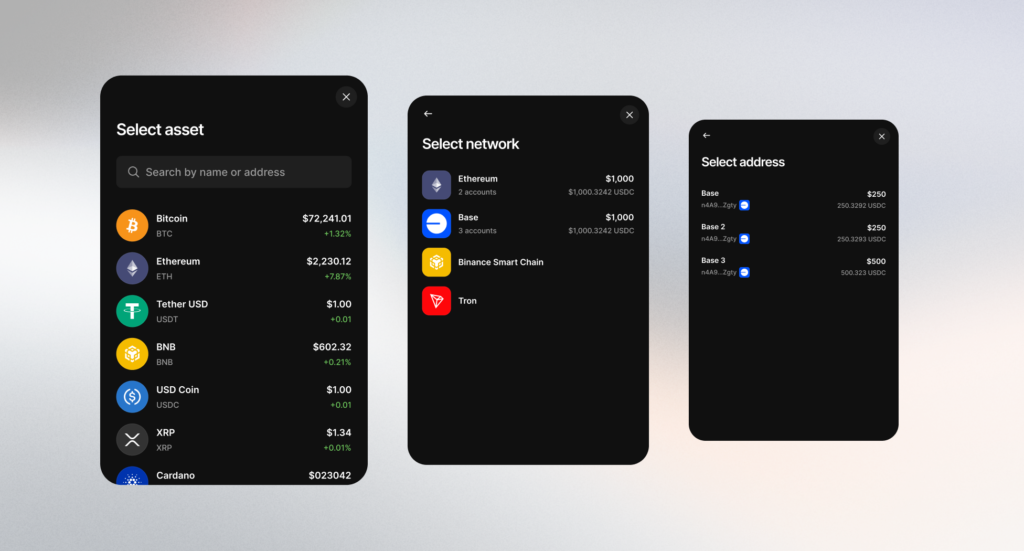
The new flow introduces more steps, but each step is clearer:
- Select your token first (e.g. USDC)
- Then select your network (Ethereum, Base, Arbitrum…)
- Then your account
By guiding you through token → network → account in that order, we dramatically reduce the chance of sending assets to the wrong place. Power users can also skip the flow entirely and paste a token address directly into the search bar.
We’re not done here either. We’ll soon be adding better guidance for users who instinctively search by network first – because not everyone thinks token-first, and the app should adapt to how you think, not force you into our mental model. We’re also working on a better way to find tokenized stocks like Nvidia or Tesla, organized by tokenizer, as this asset class continues to grow.
Why We Moved Balance Graph
One change I want to address directly: we moved the balance graph to a second level. I know some users won’t love that we changed their habits. So here’s the reasoning.
We wanted faster, more prominent access to your balance on the home screen. When you open Ledger Wallet, the first thing you see should be your number – not a chart you need to interpret.
But more importantly, the analytics experience in its previous form was a compromise. It lived on the home screen but didn’t have the space to be truly useful. Later this year, we’re bringing a much richer analytics page where you can deep dive into your assets, track P&L and returns, and get a tailored view of how your portfolio is actually performing over time.
The logic is straightforward: you check your balance multiple times a day – that should be instant and front-and-center. You deep-dive into analytics occasionally – and when you do, you deserve a dedicated experience with everything you need, not a cramped chart squeezed into the home screen.
The current experience was a compromise. The upcoming one won’t be.
Choice You Can Actually Understand
This redesign reflects something we think about constantly at Ledger: the difference between giving users options and giving them clarity. More features doesn’t mean more freedom if those features create confusion. Real freedom in a product requires choices you can actually understand and control that doesn’t overwhelm.
That’s the principle behind every decision in this Home Tab – from the information hierarchy to the token search flow to the analytics trade-off. We’re not just adding features. We’re rethinking how information is organized so the app works the way you actually use it.
This is just one piece of Ledger Wallet 4.0. I’ll be diving deeper into other design decisions in the coming weeks.
Unlock The Full Potential of Ledger Wallet
Make sure you have the latest version of Ledger Wallet to discover the app’s innovations. To learn how to update the Ledger Wallet app on your computer or mobile, check out this tutorial. For a full overview of the new interface and changes, see Ledger Wallet 4.0 overview.
Guillaume Mathias, Executive Vice President of Product
Disclaimer:
Ledger does not provide any financial advice or recommendation. Crypto transaction services are provided by third-party service providers. Ledger provides no advice or recommendations to use any of these third-party services. Rewards are not guaranteed.