Ledger Wallet™ just got a major upgrade.

Take control today

Bitcoin wallet

Software wallet ease and speed. Cold storage security.

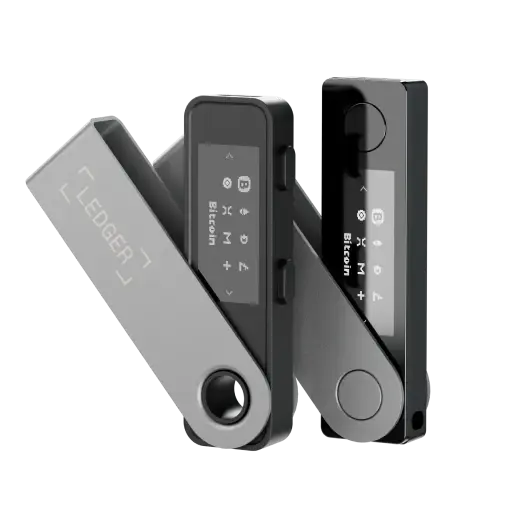
The Ledger Wallet app gives you the day-to-day usability of a software wallet, with one defining difference: your private keys stay offline* on a paired Ledger hardware signer, and you can verify every Bitcoin transaction before you approve it on the EAL6+ Secure Element protected screen.
The all in one Ledger Wallet app is free to download for iPhone, Android, Mac, Windows and Linux. A secure Ledger hardware signer is required to take full control of your BTC with genuine self-custody and transparency.

Join over 8 million happy customers who trust Ledger to safeguard their BTC. By pairing our hardware wallet with the Ledger Wallet app (for mobile & desktop), you get the ultimate security of cold storage with the ease of managing your Bitcoin day-to-day.

  • Mobile & Desktop App
  • Made safe with Secure Element chip
Get a Ledger device

Trusted by over 8 million customers

Bitcoin  wallet
Ledger Secured Solution

How to choose a Bitcoin wallet

Choosing a Bitcoin wallet comes down to four questions: who controls the keys, where those keys are stored, how you plan to use BTC day-to-day, and which devices you want it on. Get those four right and the rest is detail.

  • Custody. If your BTC sits on a centralized exchange, the exchange holds the keys — and can freeze, lose, or restrict access to your funds. A self-custody wallet means you, and only you**, hold the keys.
  • Security model. Software wallets keep keys on an internet-connected phone or laptop, which is convenient but can be exposed to malware. Hardware wallets keep keys offline* on a dedicated device. The latter is the industry standard for secure management of BTC balance.
  • Use case. Long-term holding calls for hardware-led self-custody as the baseline. Sending and receiving frequently calls for an interface that’s actually pleasant to use day-to-day — which is where most hardware-only setups fall short.
  • Platform. Mobile, desktop, browser. The right wallet runs on whichever device you actually open ten times a week, not the one its maker prefers.

The honest answer: most people are best served by a software wallet UX paired with hardware-grade key storage. That combination is what the Ledger Wallet app, paired with a Ledger device, is built to deliver.

A Ledger device for your key

Your private keys are stored offline* on a Ledger device, protected by a certified Secure Element chip — the same class of chips used in passports and bank cards. Cold storage isolates your BTC from malware and remote attacks, leaving you in sole custody.

The Ledger Wallet™ app for everything else

The Ledger Wallet app is the front end. Send, receive, buy, sell, swap*** and track BTC with the convenience of a classic software wallet. Every Bitcoin transaction is sent to the device for verification and signing, with your keys protected.

How to set up your Bitcoin wallet

1
Get a Ledger signer

Get a Ledger signer

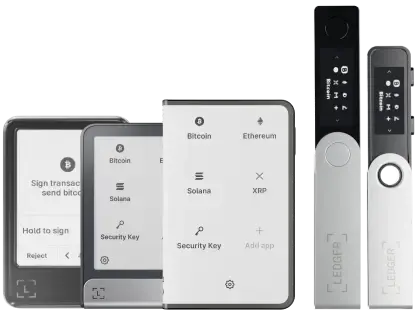
Choose the Ledger device that fits how you’ll use Bitcoin. All Ledger devices store keys on a Secure Element chip and run Ledger OS. The touchscreen models add Clear Signing and Transaction Check, so you can verify every BTC transaction on a larger screen.

Choose your hardware device

2
Download the Ledger Wallet™ app

Download the Ledger Wallet™ app

Install the app on iPhone, Android, Mac, Windows or Linux. Pair it with your Ledger device once and you’ve got mobile and desktop access to the same Bitcoin accounts.

3
Add a Bitcoin account

Add a Bitcoin account

Open the app and add a Bitcoin (BTC) account. From there you can send, receive, buy and swap BTC***. Native SegWit by default, with Legacy and Taproot supported when you create the account.

One of the best ways to keep your Bitcoin secure

Compare our hardware wallets

Why the Ledger Wallet app is one of the best Bitcoin wallets

Manage Bitcoin from one app

Manage Bitcoin from one app

Send, receive, swap*** and track BTC from a single interface, mobile or desktop, with the same accounts and the same balance on both. Real-time portfolio and Bitcoin price tracking are built in. Multi-chain support is there if you need it; Bitcoin is the focus.

Every transaction is sent to your Ledger device, where you verify the address and amount on the device’s own screen before signing. Keys never leave the device*. 

Buy BTC into self-custody

Buy BTC into self-custody

Buy Bitcoin directly from trusted third-party providers via the Ledger Wallet app, with the BTC delivered straight to your self-custody wallet. No exchange holding it for you. No extra network-fee transfer to move it later.

Buy Bitcoin

Bitcoin wallet types compared

There’s no universal “best” Bitcoin wallet. There’s the right wallet for how you hold and use BTC. Below is an honest comparison of the main categories, with the Ledger Wallet app and device combination as the final row.

Wallet type Custody Key storage Mobile / Desktop Transaction signing Recovery Best for
Custodial exchange (Coinbase, Binance, Kraken) Custodial — exchange holds keys Exchange servers Web and mobile On the exchange platform Account recovery via email and 2FA Buying and trading; not for holding substantial balances
Mobile software wallet (BlueWallet, Phoenix, Bitcoin.com Wallet) Self-custody On the phone Mobile-first On the phone 12 or 24-word seed phrase Small balances and day-to-day Bitcoin spending
Desktop software wallet (Sparrow, Electrum) Self-custody On the computer Desktop-only On the computer 12 or 24-word seed phrase Power users wanting advanced Bitcoin features
Browser extension (MetaMask and similar) Self-custody In the browser profile Desktop-only In the browser 12-word seed phrase Multi-chain DeFi; not Bitcoin-native
Hardware wallet alone (Trezor, BitBox, Coldcard) Self-custody Offline on the device Companion app, varies by maker On the device 12 or 24-word seed phrase Long-term cold storage for technical users
Ledger Wallet app + Ledger device Self-custody Offline on the Secure Element chip Mobile and desktop, full parity On-device, with Clear Signing 24-word recovery phrase, with optional Ledger Recover backup Day-to-day Bitcoin use with uncompromised key security

The Ledger combination doesn’t sit cleanly inside any single row above. That’s the design. The app brings the UX of a software wallet; the device brings the key storage of a dedicated hardware wallet. You don’t have to choose between convenience and security.


*More info on how we store private keys offline can be found here.

**An optional service, Ledger Recover, allows you to securely back up your wallet by exporting encrypted fragments of your seed to trusted providers. This service requires your explicit, manual consent on your Ledger device and is provided by Coincover.

***Rewards are not guaranteed. Buy, send/receive, swap, stake and other crypto transaction services are provided by third-party providers, whose availability may vary based on jurisdiction and territory. Ledger provides no advice or recommendations to use any of these third-party services.

Chosen by 8,000,000+ customers

“Ledger = peace of mind. I'm sure some of us know that unsettling feeling when you know you need a Ledger but haven't quite organized yourself to get it sorted. If I did it all again, I'd start with having a Ledger.”

Janet Onagah @Janet_Oganah

"I got hacked in January and lost 1000s worth of NFTs. I felt disgusted, lost, and willing to quit. Until my friend told me he's ordering a Ledger. So, we bought the duo deal. Since then, I've been sleeping."

PrimeNic.eth @primenic_eth

“I use multiple Ledgers. Different colours = different uses.Public Wallet. Never touch long term storage. Day to day fund holdings. A back up just in case.”

winny.eth @winnyeth

"I have 3 Ledgers. Hot Wallet: minting/drawings etc. Main wallet: store most NFTs. Vault wallet: cold storage of crypto."

2160 @rekt2160

“I have 5 Ledger total. My personal NFT bag. 1 for testing. And 1 for each of my 3 daughters.”

Fanzo 🧢 11.11.22 @iSocialFanz

"If I could, I would name my Ledger Hagrid. Cause it's the keeper of my keys."

Petrica Butusina @PetricaButusina

"My Ledger is already called "Stew". As it is the steward who looks after my crypto & NFTs, so I can sleep at night."

Lkmland Crypto 💫 @LkmlandCrypto

"Ledger makes cold storage downright easy. My NFTs land infinitely safer and I don’t have to feel as paranoid about connecting to new smart contracts."

Matt Oney @MattOney93

Cryptocurrencies similar to Bitcoin supported by Ledger crypto wallets

Bitcoin, Ethereum, USDT, Solana and more…

FAQ

Find answers to some of the most common questions.

A hot wallet keeps your private keys on an internet-connected device, like a phone or laptop. That’s convenient but could expose the keys to malware and remote attacks. A cold wallet keeps the keys offline* on a dedicated device, isolated from the internet.

Cold storage is the standard recommendation for any Bitcoin balance you wouldn’t want to lose. The Ledger Wallet app gives you a hot wallet’s interface with a cold wallet’s key storage. The keys live on the paired Ledger device, not on your phone.

You can install the app and explore the interface, but you can’t take self-custody of Bitcoin without a Ledger device and that’s the design intent. The reason the app is secure is that the private keys are generated and stored on dedicated hardware*, not on your phone or computer. If you want a software-only wallet, plenty exist; just understand they don’t offer the same security model.

Open the Ledger Wallet app, add a Bitcoin account, and tap Receive. The app generates a Bitcoin address. Verify that the address shown in the app matches the address shown on your Ledger device’s screen. This confirms the address belongs to your wallet and hasn’t been tampered with by anything on the connected device. Then share the verified address with the sender. The app generates a fresh address each time for privacy; older addresses still work.

In the app, tap Send, enter the recipient address and amount, and choose a network fee. Connect your Ledger device, then verify the address and amount on the device’s screen — malware on your computer can’t touch this step. Approve, and the transaction is signed on the device and broadcast to the Bitcoin network. For larger amounts it’s worth sending a small test transaction first.

Yes. The Ledger Wallet app is free to download on iPhone, Android, Mac, Windows and Linux. The Ledger device is a one-time hardware purchase. Bitcoin network fees go to miners, not Ledger. Some optional services in the app (buying, swapping, staking***) are provided by third-parties and have their own fees.

Not at the moment. The Ledger Wallet app handles on-chain Bitcoin transactions. If Lightning support is essential for your use case, a dedicated Lightning wallet is the right tool to pair with cold storage.

The Ledger Wallet app uses Native SegWit (bech32, addresses starting with bc1) by default for lower fees and broad compatibility. Legacy (addresses starting with 1) and Taproot (bc1p) are also supported. You can choose the format when you add the Bitcoin account.

No. A Bitcoin address only receives BTC sent on the Bitcoin network. Sending Ether, Solana, USDT or any other asset to a Bitcoin address — or sending BTC to a Bitcoin Cash or Bitcoin SV address — typically results in permanent loss of those funds. Always confirm both the asset and the network before sending.

A hot wallet keeps your private keys on an internet-connected device, like a phone or laptop. That’s convenient but could expose the keys to malware and remote attacks. A cold wallet keeps the keys offline* on a dedicated device, isolated from the internet.

Cold storage is the standard recommendation for any Bitcoin balance you wouldn’t want to lose. The Ledger Wallet app gives you a hot wallet’s interface with a cold wallet’s key storage. The keys live on the paired Ledger device, not on your phone.

You can install the app and explore the interface, but you can’t take self-custody of Bitcoin without a Ledger device and that’s the design intent. The reason the app is secure is that the private keys are generated and stored on dedicated hardware*, not on your phone or computer. If you want a software-only wallet, plenty exist; just understand they don’t offer the same security model.

Open the Ledger Wallet app, add a Bitcoin account, and tap Receive. The app generates a Bitcoin address. Verify that the address shown in the app matches the address shown on your Ledger device’s screen. This confirms the address belongs to your wallet and hasn’t been tampered with by anything on the connected device. Then share the verified address with the sender. The app generates a fresh address each time for privacy; older addresses still work.

In the app, tap Send, enter the recipient address and amount, and choose a network fee. Connect your Ledger device, then verify the address and amount on the device’s screen — malware on your computer can’t touch this step. Approve, and the transaction is signed on the device and broadcast to the Bitcoin network. For larger amounts it’s worth sending a small test transaction first.

Yes. The Ledger Wallet app is free to download on iPhone, Android, Mac, Windows and Linux. The Ledger device is a one-time hardware purchase. Bitcoin network fees go to miners, not Ledger. Some optional services in the app (buying, swapping, staking***) are provided by third-parties and have their own fees.

Not at the moment. The Ledger Wallet app handles on-chain Bitcoin transactions. If Lightning support is essential for your use case, a dedicated Lightning wallet is the right tool to pair with cold storage.

The Ledger Wallet app uses Native SegWit (bech32, addresses starting with bc1) by default for lower fees and broad compatibility. Legacy (addresses starting with 1) and Taproot (bc1p) are also supported. You can choose the format when you add the Bitcoin account.

No. A Bitcoin address only receives BTC sent on the Bitcoin network. Sending Ether, Solana, USDT or any other asset to a Bitcoin address — or sending BTC to a Bitcoin Cash or Bitcoin SV address — typically results in permanent loss of those funds. Always confirm both the asset and the network before sending.

Related Resources

Stay in touch

Announcements can be found in our blog. Press contact:
[email protected]

Subscribe to our
newsletter

New coins supported, blog updates and exclusive offers directly in your inbox


Your email address will only be used to send you our newsletter, as well as updates and offers. You can unsubscribe at any time using the link included in the newsletter. Learn more about how we manage your data and your rights.