






Misc. | 10/15/2026
Ledger Atom™ – Whitepaper
📓 Table of Contents
- 🌍 Introduction
- 💡 At a Glance
- 🏗️ Two Modes
- 🖥️ Secure Screen
- 🔐 Benefits of Secure Mode
- 🌐 Online Signer
- ✨ Ownership
- 🧩 Platform
- 🛡️ Security
- 🔭 Conclusion
- 📖 Abbreviations
🌍 Introduction
Until now, Ledger hardware signers have operated on a simple and effective security model: they do not have a direct internet connectivity, and the screen you see is controlled exclusively by Ledger OS™ running on a certified Secure Element. When, for example, you confirm a transaction on Ledger Nano X™ or Ledger Flex™, what you see on screen is what actually gets signed. The architecture is designed so that applications or malwares on your computer cannot alter a transaction.
Ledger Atom™ changes the form factor, not the security model. It is built on Ledger OS™, the operating system that powers Ledger signers, with a hardened mobile operating system alongside it for everyday use: a Mobile OS to explore, Ledger OS to approve. In this document, the Mobile OS can also be called the Standard Mode. The two environments coexist on the same screen, but the Ledger signer concept remains, with physical isolation at the hardware level between these two worlds.
This document explains in detail how that isolation works, why it is designed to hold even if the Mobile OS is fully compromised, and how the device compares to other approaches, including smartphones that use TEE or already contain dedicated security chips.
💡 At a Glance
Ledger Atom is the first Ledger device that lets you live on a connected signer with a Mobile OS without giving up the security properties of a Ledger signer. The Mobile OS allows you to handle your everyday life. Ledger OS is the security foundation handling the Secure Mode, and the Mobile OS runs in parallel. The Secure Mode handles everything that matters the most: your keys, your seed, your signatures. These two modes run on dedicated physically separate chips. A custom Ledger hardware switch driven by Ledger OS cuts the Standard Mode off from the screen and touch panel when a sensitive operation begins. The Secure Mode is designed so that software running on the Mobile OS, including a compromised application, cannot override that separation. Your seed stays in the Secure Element, and approvals are made under your control.
Developers who build Mobile Applications can use the planned Ledger Atom SDK to add hardware backed approvals without building for dedicated hardware, and can maintain one application handling for Ledger Atom and other compatible devices.
🏗️ Two Modes
Ledger Atom contains two independent execution environments sharing the same display and touch panel, with a patented Ledger hardware-level isolation, designed so that the Standard Mode cannot bypass it.
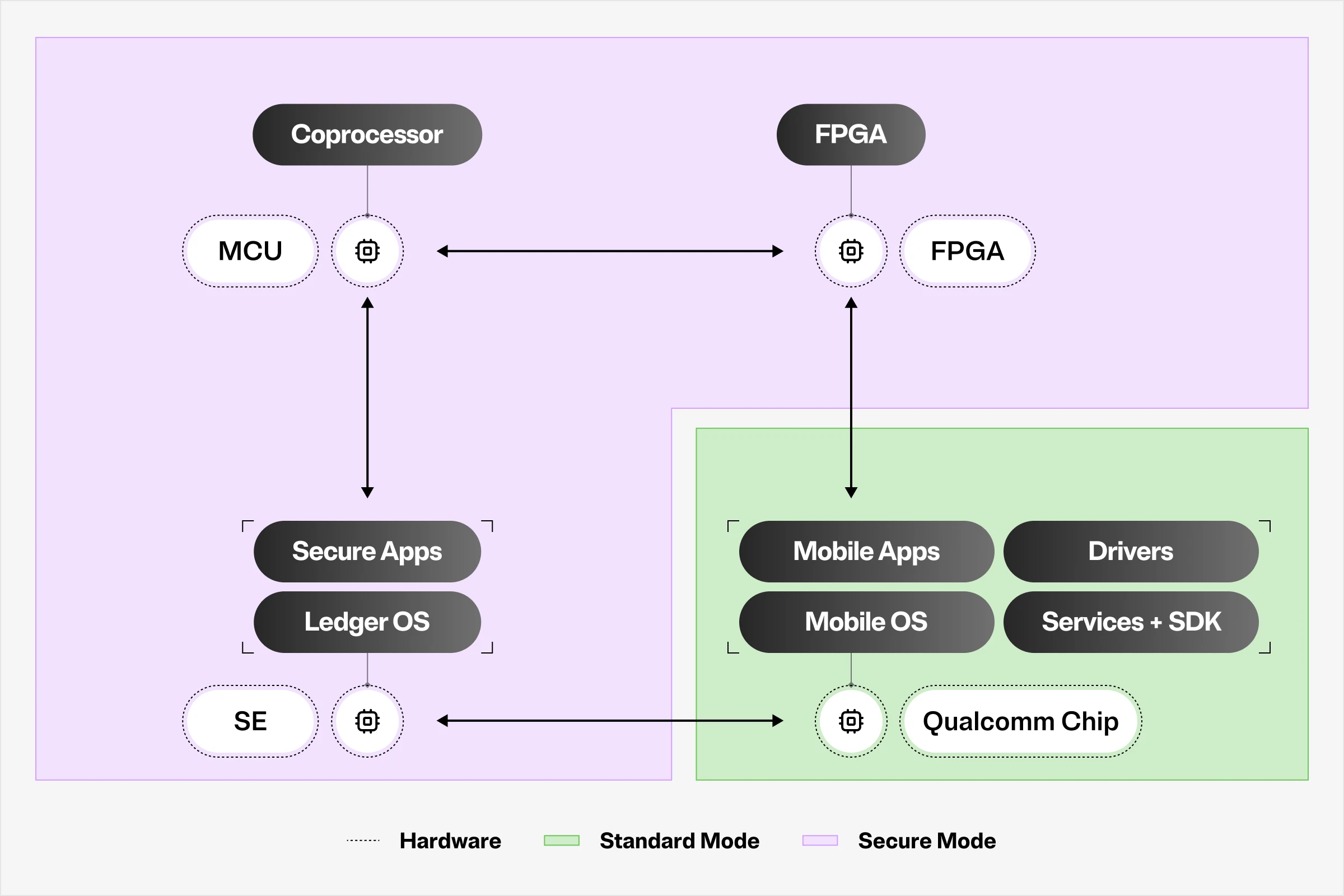
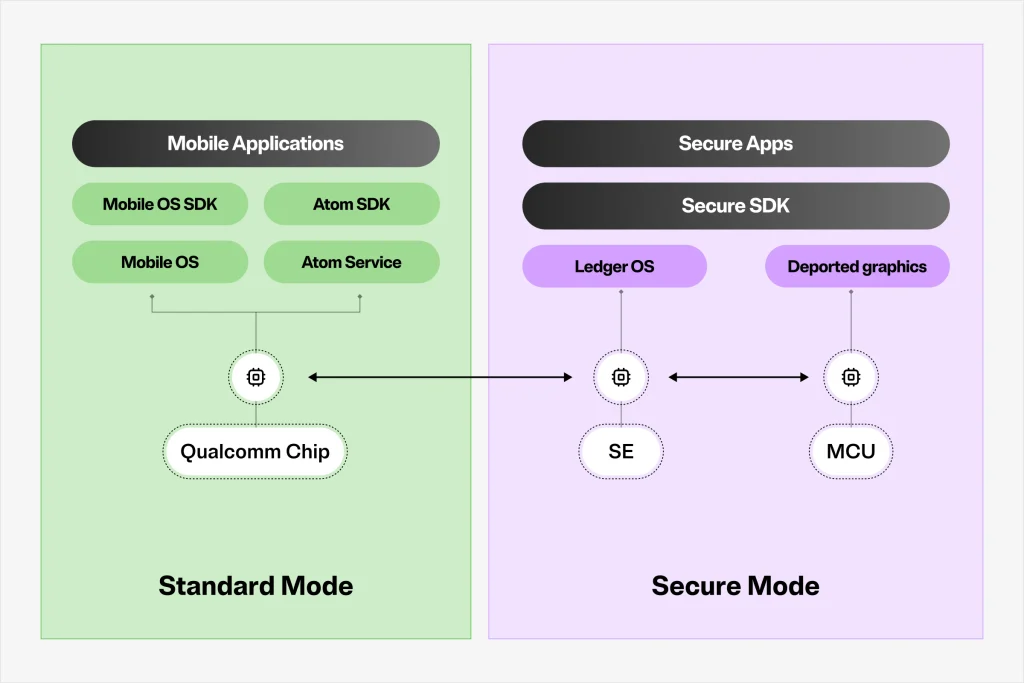
The Secure Mode runs on a standalone hardware stack. It consists of Ledger OS running on a common criteria certified (EAL6+) Secure Element (the ST54M, post-quantum cryptography ready), a microcontroller (STM32U5) acting as the Secure Element coprocessor responsible for graphic rendering and a subset of additional security countermeasures, and an integrated FPGA that acts as a physical multiplexer between the two worlds at the display and touch level. Ledger OS is the same operating system that powers all the Ledger signers and manages all the secrets, the seed, private keys, PIN, and signing operations. From this architecture, all the sensitive elements are designed not to leave this standalone hardware stack. They are not visible, at hardware level, to the SoC and thus to the Mobile OS and the applications running on it.
The Standard Mode runs on an ARMv9.2-A Qualcomm chip. It handles everyday device functions: high resolution display and camera, wired and wireless connectivity, efficient power management, responsive UX. The Mobile OS on Ledger Atom is hardened but nevertheless remains a general, performance-oriented OS that has been designed to handle a large variety of tasks, and not an OS designed specifically for security. The Ledger security model aims at protecting user data at the state of the art on the Standard Mode side, but does not rely on it for some sensitive operations. At an application level, it runs the Ledger WalletTM application and other third-party applications, some of which may use the Secure Mode.
Each mode also has its own independent unlock mechanism. The Mobile OS device credentials (pattern, password, fingerprint) unlock the Standard Mode environment and its credential-encrypted storage managed by a dedicated Secure Element. Ledger OS uses a dedicated separated PIN to unlock the Secure Mode and is required to authorize any sensitive operation (the Ledger OS PIN is designed not to be transmitted to, stored by, or accessible from the Standard Mode side).
The two worlds communicate through a tightly controlled channel: a dedicated physical interface between the Qualcomm chip and the Secure Element powered by Ledger OS, using a Ledger protocol encapsulated in a secure channel. The channel is designed so that the Mobile OS can only send requests to the Secure Mode. The Standard Mode cannot force a switch back from the Secure Mode without Ledger OS accepting the event, and cannot observe what happens inside, forge what the Secure Mode displays, or inject any action or approval. At the Standard Mode application level, all data exchange with the Secure Mode goes through Ledger’s existing SDK stack, which will integrate additional interfaces to support developers with the new Ledger Atom enhanced features.
Each side also has its own dedicated Secure Element for its own secrets. The Standard mode related SE implements security primitives for credentials and storage protection. The Ledger OS SE holds the signer seed and handles all blockchain-related signing, as well as other sensitive cryptographic keys. The two chips have independent dedicated functions but are connected so that the malfunction or replacement of one is treated as a security event.
Secure boot and updates are enforced on the Mobile OS, Ledger OS, MCU and FPGA components. The Mobile OS boots through a verified chain anchored in Ledger-controlled keys, with rollback protection. The Ledger OS firmware, the MCU firmware, and the FPGA bitstream are each signed by Ledger and verified at boot. The FPGA bitstream is stored in its associated flash memory, and the MCU verifies its authenticity before the FPGA is allowed to operate. Rollback protection is designed to prevent any of these components from being downgraded. All over-the-air updates require a multi-party quorum of Ledger-controlled HSM-backed signing keys (the process is designed so that no single Ledger employee or production line operator can push a firmware to production devices).
Nothing from the Secure Mode is synced, backed up, or accessible by the Standard Mode without the Secure Mode granting explicit access. The seed does not live in the Mobile OS storage.
🖥️ Secure Screen
On a standard smartphone, and on most devices with dedicated security chips, the SoC with its associated Mobile OS low layers running on it controls every pixel on the display and every touch event from the screen. If the Mobile OS or low level firmware from the SoC manufacturer is compromised, the screen may potentially lie. A malicious application or a rooted device can show you one transaction and sign a completely different one. The software layers that render what you see on this kind of device are also the software layers that could be tampered with.
Display and Touch Isolation
Ledger Atom breaks this assumption at the hardware level. A secured FPGA, running a Ledger specifically developed bitstream, is located between the SoC and the display panel, intercepting both the display bus and the touch bus. The FPGA operates in two modes, and only Ledger OS can command a mode switch.
Standard Mode is the default state. The FPGA acts as a transparent bridge, passing the SoC’s display output directly to the panel and routing touch events to the SoC. The Mobile OS has full control of the screen, except for the Secure Bar (described below). This is standard day-to-day use.
The Secure Mode is activated by Ledger OS whenever a sensitive operation is required. Upon activation, the FPGA cuts the Qualcomm chip off from the display and touch. The Standard Mode display signal is discarded and display touch events go only to Ledger OS. The screen is now driven exclusively by Ledger OS running on its Secure Element, through a secure MCU, and up to FPGA graphics RAM. The architecture is designed so that even if the Mobile OS is rooted by a sophisticated attacker, it cannot see what is on screen, cannot read what the user is typing, cannot modify any information displayed, and cannot inject a tap.
The Secure Bar
The Secure Bar is a reserved strip at the very top of the display rendered by the FPGA under the exclusive control of Ledger OS. The Mobile OS cannot draw pixels in this area (the FPGA discards them). It shows the user at a glance whether the device is in Standard Mode or Secure Mode.
The Privacy Switch
The Privacy Switch is a dedicated hardware button that immediately cuts power to a predefined set of peripherals (camera, microphone, and any other sensors deemed sensitive like accelerometer for example). It operates at hardware level, independently of the software stack. Pressing it cuts power to those peripherals, and no software layer, no application, and no remote attacker with full Standard Mode control can prevent that. The Secure Bar shows the switch state. Moreover, and independently of the Privacy Switch position, these peripherals are always cut when the Secure Mode is active.
Physical Tamper Protection
Physical tamper protection covers the entire Secure Mode hardware stack. The Ledger OS Secure Element, its graphic coprocessor MCU and the FPGA are located in a physically protected area of the PCB, enclosed behind active anti-tampering detection. The MIPI DSI tracks between the SoC and the FPGA are included in inner PCB layers and only emerge inside the protected zone, making passive interception or rerouting impractical. A second tamper perimeter covers the device opening required for normal maintenance. Upon opening, this second tamper perimeter will trigger. It can only be reset through a controlled Ledger-supervised process, making undetected physical implants significantly harder.
Genuine Check
Genuine Check is designed to let a user verify that the Ledger OS and the main sensitive chips in their device are genuine and not tampered with. Since Ledger Atom is a self-contained device, the Genuine Check is designed to work out-of-band with a secondary device placed next to Ledger Atom. During the check, a dynamic attestation code will be displayed by the Secure Mode on the Ledger Atom device. This attestation code is issued by Ledger OS and represents the hardware and firmware authenticity of the main sensitive chips in Ledger Atom. The user verifies this code via a dedicated Ledger application on their secondary device, which completes a cryptographically bound attestation session along with exchanges with Ledger HSM. The attestation is designed so that a counterfeit device cannot forge it without possessing a genuine Ledger Atom device.
🔐 Benefits of Secure Mode
Leading smartphones ship with a dedicated security chip that implements hardware-backed key storage: it stores cryptographic keys in a physically separate, tamper-resistant chip. This is a genuine security improvement over software-only key storage in Mobile OS layers (including TEE).
The Standard mode SE on Ledger Atom (handling a hardware-backed keystore capable of handling secure operations, and the protection of the secret assets for lock screen credentials) and the Ledger OS SE (handling cryptographic keys related to blockchain transaction, signing and other use cases) are two separate physical chips with distinct firmware stacks powering them.
Ledger Atom Secure Mode does not use the same architecture as a standard smartphone with a dedicated security chip. The distinction matters for high-value operations like signing a blockchain-related transaction or using secrets to perform various types of authentications and signatures.
On Ledger Atom:
- The transaction request arrives to the Standard mode through the SDK, but the Secure Application running on top of the Ledger OS in its dedicated SE independently parses what matters regarding information clearsigning from that request.
- The transaction details are rendered by Ledger OS on a screen that the Standard mode cannot access in Secure Mode.
- The PIN and approval tap come through a touch bus that is physically disconnected from the Mobile OS at the FPGA level.
- Ledger OS decides whether to sign following the user’s consent.
- The keys used for the signature are designed to remain within the Ledger OS Secure Element.
🌐 Online Signer
A connected device is inherently more exposed than an air-gapped hardware signer. The concern is valid in general, network connectivity expands the attack surface. But the question is which attack surface expands, and what the Secure Mode is designed to keep out of its reach.
What connectivity expands most directly is the SoC and the Mobile OS attack surface. A sophisticated attacker who exploits a vulnerability in SoC firmware, Mobile OS stack, in a third-party application, or in the network stack gains control of parts or full environment. This is a real threat that the Mobile OS hardening addresses through security features as: ARMv9.2-A memory safety, IOMMU/SMMU isolation, hardened kernel and TEE for instance. But from Ledger’s perspective, these features are not designed to provide the level of protection required against key theft or unauthorized signing when dealing with specific sensitive operations.
An attacker with partial or full control of the Mobile OS can:
- Read anything Standard Mode has access to (application data, cached content, credentials), including information and secrets displayed on the screen;
- Alter the transaction request sent from a Mobile Application to Ledger OS;
- Show the user misleading information in the interface before the Secure Mode takes over;
- Disrupt the Standard mode user experience;
- Forge user phishing by providing a fake transaction built by the attacker.
On Ledger Atom, the architecture is designed so that an attacker with partial or full control of the Mobile OS cannot:
- Read the seed phrase or private keys (they are exclusively stored and used by Ledger OS in its Secure Element);
- See what Ledger OS displays on the screen in Secure Mode, nor inject nor read a touch event in Secure Mode (the display bus is directly managed by the Ledger OS SE through the Secure Mode chips and the Qualcomm chip that runs the Mobile OS has no physical access to this display bus that is isolated by the FPGA);
- Approve a transaction on behalf of the user. The approval requires a user performing a physical tap on the touch that is under exclusive Secure Mode control;
- Make Standard Mode pass as Secure Mode. The Standard Mode can draw a fake approval screen, but it cannot draw the Secure Bar, so the bar will not show Secure Mode. Check the Secure Bar before every approval.
The seed is generated by Ledger OS at setup and is not exposed in clear to the Standard Mode or to any software interface. Seed handling is the same as on other Ledger signers.
The connectivity of Ledger Atom expands what you can do on the device. It is designed not to weaken the protection Ledger OS gives your keys.
This is what makes Ledger Atom a genuinely new category of secure devices. Previous Ledger signers require a paired device to act: connectivity is delegated to a phone or computer that Ledger OS does not trust. Ledger Atom collapses that dependency. The same device that browses, communicates, and runs AI agents is also the device where you approve, and that signs and attests. The perimeter of what is possible expanded around the security boundary.
✨ Ownership
Every capability Ledger Atom introduces across digital assets, AI agents, identity, private communications and many more, is built on a single principle: sensitive actions require your physical confirmation, provided on secure areas designed so that no software can reach them to tamper with your actions. This is Proof of You™. It is the property that the hardware and software described in this document is designed to enforce. The four experiences below are some of its representations.
Ownership
Ledger Atom carries a full digital asset experience within the Mobile OS environment. What distinguishes it from any other mobile wallet is that every related authorization, transactions, signatures and approvals are rendered by Ledger OS on the Secure Screen and confirmed through hardware-isolated touch. Users own their private keys in the Ledger OS Secure Element.
AI Agents Permissions
AI agents are increasingly capable of acting on a user’s behalf: booking, trading, committing, transacting. The architectural problem is that in many agents today, actions execute on software-controlled infrastructure where the approval moment, the screen the user sees before they confirm, can be fabricated. Ledger Atom addresses this at the hardware level. Through the Ledger Agent Stack, AI agent actions that require user authorization are routed to the Secure Mode. The details of the intended action are rendered by Ledger OS within the Secure Mode. The user physically approves on hardware-isolated touch. The agent cannot proceed without that confirmation, and the Secure Mode is designed so that no software on the Standard Mode side can forge it. The speed and scale of AI remain intact. The approvals stay with the user.
Proof of Identity
The Ledger Atom Secure Mode will be able to generate cryptographically bound attestations that a physical confirmation was made on a genuine Ledger OS device, for a specific action, at a specific moment, by a human. It is rooted in the same Secure Element that holds the user’s keys, rendered on the same Secure Screen that the Standard Mode cannot reach, and confirmed through the same hardware-isolated touch path. The result is evidence that an action was confirmed on the device and not generated by software, which a relying system can verify. An attestation shows that a confirmation took place on the device.
General Encryption
The Ledger Atom architecture is designed to enable a communications model in which plaintext never passes through the Standard Mode. Messages are encrypted and decrypted within the Secure Element, while the Mobile OS layer only handles ciphertext. This capability grows with the network of Ledger Atom devices and is a property of the architecture that becomes more useful as adoption builds.
🧩 Platform
Third-party developers will be able to build applications that leverage the Secure Mode, to sign transactions, authenticate users, store secrets, or display sensitive data on the Secure Screen. The platform is designed so that applications do not see the seed and cannot modify Ledger OS.
The Ledger Atom SDK is an additive extension of a standard Mobile OS SDK. It does not replace or wrap any standard Mobile OS APIs. It is the entry point for communication between a Mobile Application and the Secure Mode, acting as the client side of the Ledger Atom Service. Developers who already use Ledger’s Device Management Kit (DMK) for communicating with external Ledger signers will recognize the model. The Ledger Atom SDK follows the DMK model but replaces the BLE/USB transport with the on-device Ledger Atom Bridge.
Secure Applications (such as Ethereum or Bitcoin) run on top of Ledger OS. They parse incoming requests, manage the business logic associated with their use case, render the Secure Mode display, manage the confirmation flow, and return results. They are developed with Ledger’s Secure SDK, either by Ledger or by third-party Secure Applications publishers, who own their Secure Application and remain responsible for it. Before one is made available for download, it must go through Ledger’s technical and security review and signature process. The Secure SDK is designed so that a malformed or malicious request from the Standard Mode cannot cause a Secure Application to sign something the user did not see and confirm: the Secure Application builds its own clear-signing display from raw parsed data, never from a pre-rendered frame provided by the Mobile OS.
The software stack is designed so that an application cannot interrupt another application’s active Secure Mode session.
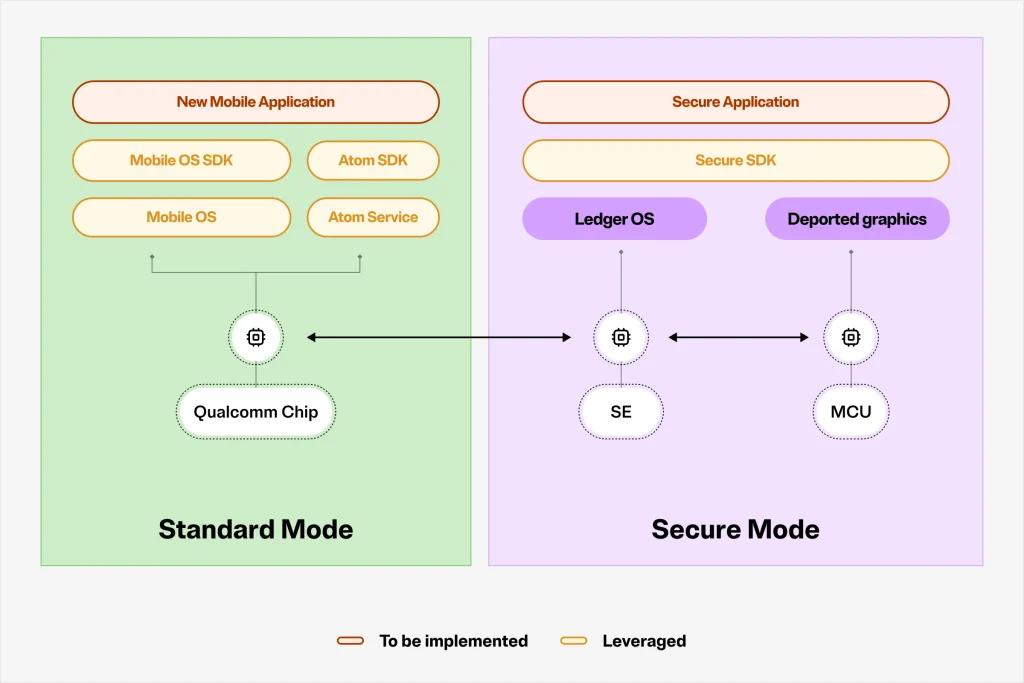
Three typical integration scenarios exist, ordered by effort.
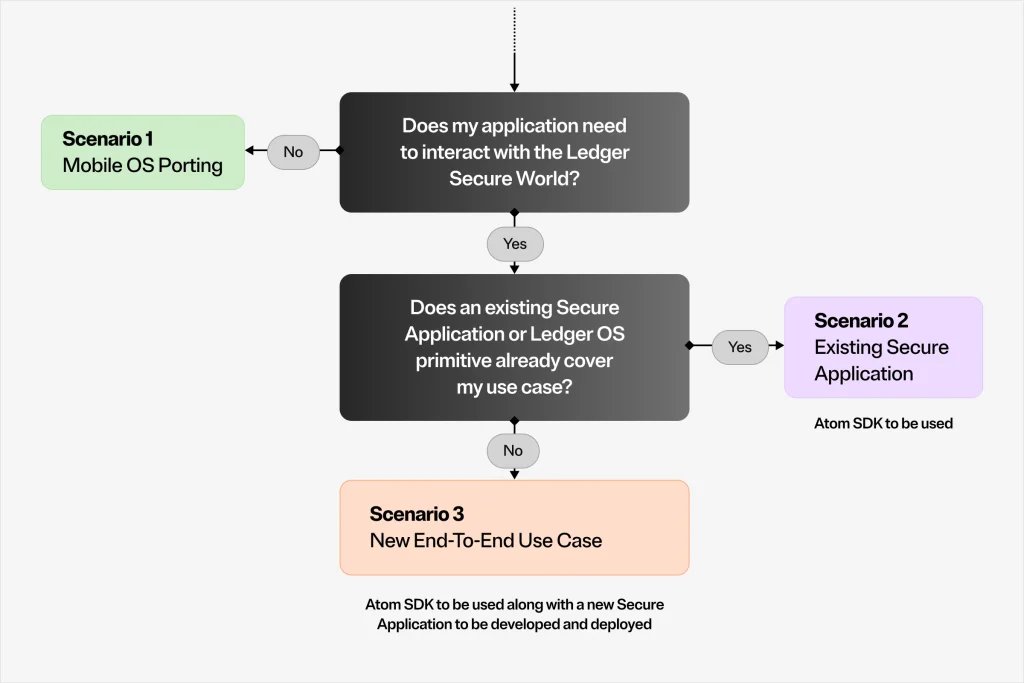
In Scenario 1, an existing Mobile Application requires no functional modification to run on Ledger Atom. It uses standard Mobile OS APIs, and has no dependency on the Ledger Atom SDK, however depends on the porting onto the Mobile OS SDK. The main task is thus a porting, from the use of existing Mobile OS SDKs to ours.
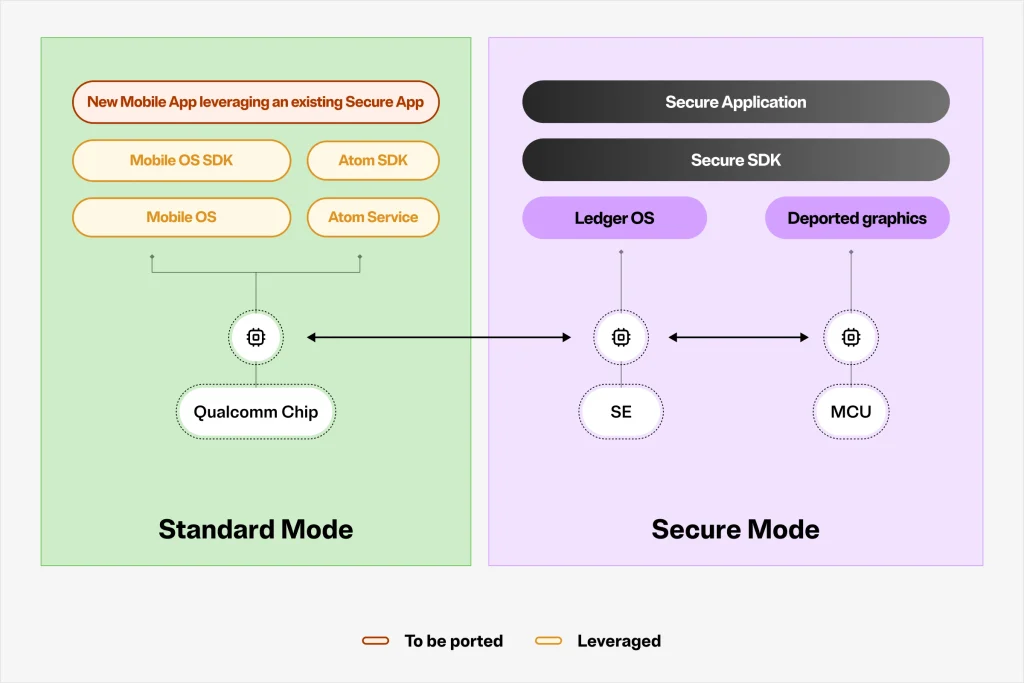
In Scenario 2, a developer wants to interact with an existing Ledger Secure Application (for example, to submit an Ethereum transaction from their application for signing). They build the Mobile Application side of their product using the Ledger Atom SDK and documentation. The Secure Application already exists, whether owned by Ledger or a third party developer. No Secure Mode development is required. The integration mirrors existing DMK-based integrations, with the transport replaced by the Ledger Atom Bridge.
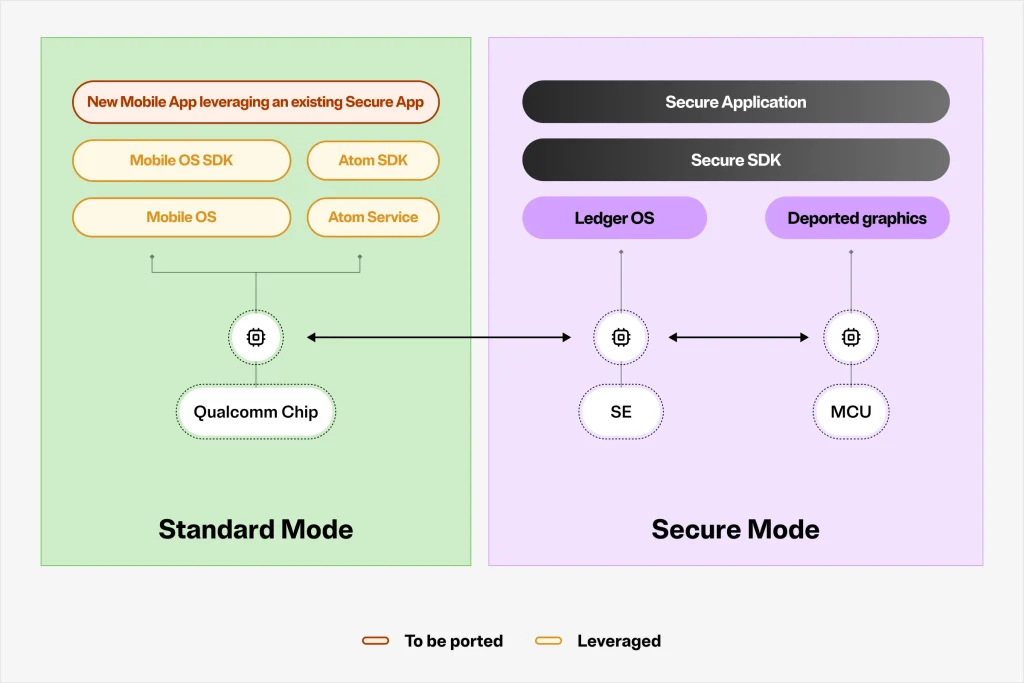
In Scenario 3, a developer wants to build a new end-to-end use case, a new Mobile Application and a new Secure Application that communicate through a custom APDU command set. The lower layers of Ledger Atom SDK handle the transport. The Secure SDK handles the Secure Application implementation entry points. Any new Secure Application must follow the standard Ledger submission procedure and be signed by Ledger before it can be deployed and made available for users. Ledger’s reviews and signature are technical requirements of the platform. They do not constitute an endorsement or guarantee of the application. The Secure Application owner remains solely responsible for the application, its maintenance and its security.
🛡️ Security
Ledger does not ask users to trust claims about security. Every component of the security architecture described in this document is subject to independent review, formal certification, or both.
CSPN is a product-level security certification issued by ANSSI, the French National Cybersecurity Agency. It evaluates the security functions that end users directly rely on: key storage, transaction signing, Secure Screen integrity, PIN handling, and the Genuine Check mechanism. Ledger signers undergo a CSPN security evaluation at least at launch, and CSPN will evaluate Ledger Atom as a complete system and whether the security properties described in this whitepaper are correctly implemented and cannot be trivially bypassed. CSPN does not certify the underlying chip; it certifies the product behavior.
Common Criteria EAL6+ is a security certification applied among others to the Secure Elements used in Ledger Atom. It is the same class of assurance as on the Secure Elements embedded in Ledger’s existing hardware signers from Ledger Nano S Plus onwards. EAL6+ evaluates the physical and logical tamper resistance of the chip itself, its resistance to side-channel attacks, fault injection, hardware probing, and other forms of hardware-level assault. In particular the Ledger OS SE, ST54M, is EAL6+ certified, which is among the highest assurance levels applied to commercial security products. This certification applies to the chip, not to the software running on it or the broader device architecture.
Donjon is the Ledger internal security research and red-team unit. For Ledger Atom, Donjon’s review covers the split-world architecture: the FPGA display and touch switch logic, the Secure Bar rendering and isolation, Mobile OS hardening and attack surface, the firmware and bitstream update path, the anti-tampering architecture, and the threat model assuming a fully compromised Mobile OS. Donjon operates under the explicit assumption that the Mobile OS is owned by an attacker, and evaluates whether the Secure Mode boundaries hold under that condition.
In addition to the above, Ledger commissions independent security labs to audit hardware, firmware, and the software path from an application through to Ledger OS. External audits cover the FPGA bitstream and secure channel implementation, the microcontroller firmware, the Ledger OS stack for Ledger Atom, the Mobile OS hardening, and the Ledger Atom SDK and Service. Ledger’s policy is to publish audit results and findings soon after device launch.
Firmware artifacts shipped on Ledger Atom are built reproducibly: a clean rebuild from the same pinned sources and toolchain produces a bit-for-bit identical result, which any party can independently verify. Production signing requires a quorum of three individuals from separated roles, enforced by Ledger’s signing infrastructure and backed by HSMs. The process is designed so that no single employee can authorize a firmware update to production devices. All signing and distribution events are recorded in a tamper-evident audit log.
🔭 Conclusion
Ledger Atom is not a compromise between security and usability. It is a device built on the conviction that the two are compatible: that a connected environment and a genuine hardware signer can coexist in the same product without one weakening the other. The security principles are the same as on the Ledger signers that came before it: your seed stays in the Ledger OS Secure Element, your approvals happen on a screen the Mobile OS cannot touch, and the architecture is designed so that no firmware or software running on the Qualcomm chip or Mobile OS stack can authorize a signature on your behalf. What changes is everything around it. Ledger Atom brings this security model to a fully integrated experience, to a broad developer ecosystem, and to a form factor that fits in your pocket. The security properties are the same. The possibilities are new.
📖 Abbreviations
| Abbrev. | Full Term | Description |
| APDU | Application Protocol Data Unit | Command/response format used to communicate with Secure Elements. Used by Secure Applications to exchange data with the Mobile OS through the Ledger Atom Bridge. |
| CSPN | Certification de Sécurité de Premier Niveau | Product-level security certification issued by ANSSI, the French National Cybersecurity Agency. |
| DMK | Device Management Kit | Ledger’s SDK for communicating with Ledger hardware signers. The Ledger Atom SDK extends this to the on-device Secure Mode. |
| EAL | Evaluation Assurance Level | A scale within Common Criteria (CC) measuring the depth of a security evaluation. The Ledger Atom device’s chosen Ledger OS SE and Mobile OS SE target EAL6+. |
| FPGA | Field-Programmable Gate Array | A reprogrammable integrated circuit. On Ledger Atom, it acts as a hardware switch between the Mobile OS display/touch buses and the Secure Mode. |
| HSM | Hardware Security Module | A dedicated hardware device used to securely generate, store, and manage cryptographic keys. Used by Ledger for production firmware signing. |
| IOMMU / SMMU | Input-Output Memory Management Unit / System Memory Management Unit | Hardware component that isolates DMA-capable peripherals from system memory, preventing a compromised peripheral from accessing arbitrary memory. |
| MCU | Microcontroller Unit | On Ledger Atom, the STM32U5 coprocessor (MCU-SEC) that interfaces the Ledger OS SE with the FPGA and handles Secure Mode graphic rendering (graphic coprocessor). |
| MIPI DSI | Mobile Industry Processor Interface – Display Serial Interface | Standardised hardware bus connecting the SoC to the display panel. On Ledger Atom, the FPGA intercepts this bus to enforce display isolation. |
| Mobile OS | Mobile OS or Standard Mode | The operating system running on the SOC and built on Android Open Source Project. |
| OTA | Over-The-Air | Remote software or firmware update delivered over a network connection without physical access to the device. |
| PQC | Post-Quantum Cryptography | Cryptographic algorithms designed to remain secure against attacks from quantum computers. The Ledger OS SE on Ledger Atom is PQC ready. |
| SE | Secure Element | A tamper-resistant chip designed to store and process sensitive data in isolation. Ledger Atom contains one for Mobile OS credentials, and one for Ledger OS. |
| SA | Secure Application | A Ledger OS application running inside the Secure Element, responsible for parsing transaction requests, rendering the Secure Mode display, managing the confirmation flow. Developed with Ledger’s Secure SDK, reviewed and signed by Ledger before deployment. |
| SELinux | Security-Enhanced Linux | A mandatory access control framework built into the Linux kernel, enforcing strict per-process permissions. Configured with a strengthened policy in Ledger Atom. |
| SoC | System-on-Chip | An integrated circuit combining processor, memory interfaces, and peripherals. On Ledger Atom, the SoC runs the Standard Mode environment. |