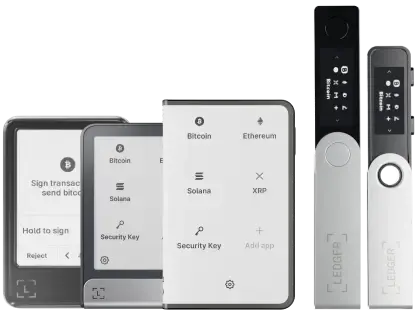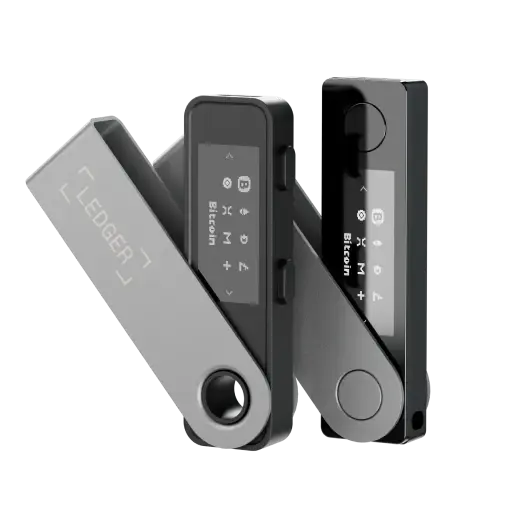

Meet Ledger Nano™ Gen5, the most playful signer yet

Discover now

Hedera wallet

Discover the right crypto wallet for your Hedera

Looking for a Hedera wallet to buy, sell, swap, or grow your Hedera? Join 8+ million happy customers who use Ledger to manage their crypto holdings every day.

  • Mobile & Desktop App
  • Secured by Hardware Wallet

Trusted by over 8 million customers

Hedera wallet
Ledger Secured Solution

How to secure your Hedera

Whether you’re looking to keep your crypto safe for long-term or manage them on a daily basis, Ledger has the right product for you.

Ledger hardware wallet

Protects your crypto wallets, keeping your private keys offline, far from hackers’ reach and resistant to online threats. Use it with the Ledger Wallet™ app for optimal freedom and control of your Hedera.

Ledger Wallet™ App

Do more with your Hedera, get timely insights, make informed choices, stake your assets… all in one place. Manage all your crypto wallets with clarity and confidence.

Quick, easy steps to get a Hedera wallet

1
Buy a Ledger hardware wallet

Buy a Ledger hardware wallet

Choose the certified secure Ledger signer that best fits your lifestyle. All Ledger devices protect your private keys with the industry-leading Secure Element chip and constantly updated Ledger OS™.

Ledger touchscreen signers give you extra control with Clear Signing, Transaction Check, and a large display for greater everyday ease. Classic Ledger swivel signers give you the battle-tested security features you need to get started with self-custody.


Choose your hardware device

2
Download the Ledger Wallet™ app

Download the Ledger Wallet™ app

Enjoy the convenience of a desktop wallet or a mobile wallet, with the security of a hardware wallet. Use this all in one app to compare service providers and monitor prices across multiple chains. Buy crypto, swap, stake, and more.

Make informed decisions at just the right time to manage your Hedera with ease and extra peace of mind.

Download the Ledger Wallet app

3
Start your Hedera journey securely

Start your Hedera journey securely

Set up a Hedera wallet account in a few seconds and manage it seamlessly via the Ledger Wallet™ app.

The best way to keep your Hedera secure

Compare our wallets

You can Buy, Manage Hedera, now ready to use

Manage your Hedera

Manage your Hedera

Ledger Wallet™ enables you to buy/sell, send/receive, swap and stake your crypto

  • all in one place, powered by popular third-party service providers.
Buy Hedera

Buy Hedera

You can buy Hedera with a credit/debit card or bank transfer. Choose from a range of service providers like MoonPay, Coinbase, and Revolut.

Your Hedera will land safely in your Ledger Hedera Wallet.

Buy Hedera

What is Hedera (HBAR)?

Hedera is a decentralized public network where developers can build secure, fair applications with near real-time consensus. The platform is owned and governed by a council of global innovators including Avery Dennison, Boeing, Deutsche Telekom, DLA Piper, FIS (WorldPay), Google, IBM, LG Electronics, Magalu, Nomura, Swirlds, Tata Communications, University College London (UCL), Wipro, and Zain Group.
The Hedera Consensus Service (HCS) acts as a trust layer for any application or permissioned network and allows for the creation of an immutable and verifiable log of messages. Application messages are submitted to the Hedera network for consensus, given a trusted timestamp, and fairly ordered. Use HCS to track assets across a supply chain, create auditable logs of events in an advertising platform, or even use it as a decentralized ordering service.

Chosen by 8,000,000+ customers

“Ledger = peace of mind. I'm sure some of us know that unsettling feeling when you know you need a Ledger but haven't quite organized yourself to get it sorted. If I did it all again, I'd start with having a Ledger.”

Janet Onagah @Janet_Oganah

"I got hacked in January and lost 1000s worth of NFTs. I felt disgusted, lost, and willing to quit. Until my friend told me he's ordering a Ledger. So, we bought the duo deal. Since then, I've been sleeping."

PrimeNic.eth @primenic_eth

“I use multiple Ledgers. Different colours = different uses.Public Wallet. Never touch long term storage. Day to day fund holdings. A back up just in case.”

winny.eth @winnyeth

"I have 3 Ledgers. Hot Wallet: minting/drawings etc. Main wallet: store most NFTs. Vault wallet: cold storage of crypto."

2160 @rekt2160

“I have 5 Ledger total. My personal NFT bag. 1 for testing. And 1 for each of my 3 daughters.”

Fanzo 🧢 11.11.22 @iSocialFanz

"If I could, I would name my Ledger Hagrid. Cause it's the keeper of my keys."

Petrica Butusina @PetricaButusina

"My Ledger is already called "Stew". As it is the steward who looks after my crypto & NFTs, so I can sleep at night."

Lkmland Crypto 💫 @LkmlandCrypto

"Ledger makes cold storage downright easy. My NFTs land infinitely safer and I don’t have to feel as paranoid about connecting to new smart contracts."

Matt Oney @MattOney93

Cryptocurrencies similar to Hedera supported by Ledger crypto wallets

Bitcoin, Ethereum, USDT, Solana and more…

FAQ

Find answers to some of the most common questions.

Ledger is one of the best crypto wallets according to Forbes, TechCrunch, Bloomberg, and much more websites.

Ledger is a non-custodial wallet supporting over 5 500 cryptocurrencies including Hedera (HBAR).

Thanks to the Ledger Live mobile and desktop app, you can manage your HBAR tokens, check your real-time balance, track transaction histories, and more. You also have the possibility to connect your Ledger to the well-known HashPack software wallet.

When you first buy cryptocurrency, you’re issued with two keys: public and private.

  • A public key serves as an address that can be shared with other parties to perform transactions.
  • A private key represents a randomly generated number that signs transactions and protects your assets from malicious attacks. If it gets compromised or lost, you won’t be able to access your hardware wallet to spend, withdraw, or transfer your cryptocurrencies.

To safeguard and keep track of your keys, you can use online or offline wallets. Online wallets, also known as hot wallets, store private keys on systems or devices that are connected to the internet. Hot wallets are easy and convenient to use, however, they come with several drawbacks. Besides being susceptible to attacks and a honeypot for hackers, with hot wallets, the custody of private keys is often entrusted to a third party such as a crypto exchange, which means you never have full control over your funds. The safer choice are specialized hardware wallets that store private keys offline. Stealing private keys from a hardware wallet would require physical access to the wallet and corresponding PIN or the recovery phrase. What’s more, with hardware wallet, you don’t need to rely on third party custodians.

Ledger Nano is the industry-leading hardware wallet. With more than five million customers, Ledger Nano wallets have several layers of security that protect private keys, and hence your assets:

  • Your private keys are stored on secure element chips.
  • A PIN code and a 24-word recovery phrase are required to access the wallet.
  • Ledger Nano hardware wallets have been built using highly durable materials for protection against physical damage.

With full isolation between private keys and your computer/mobile, Ledger Nano cold wallets keep your keys secure and give you complete control over your tokens.

HBAR Wallet app refers to a mobile or desktop application cryptocurrency wallet designed specifically for Hedera Hashgraph’s native cryptocurrency, HBAR.
Ledger Live is an HBAR Wallet app for both iOS and Android platforms, as well as for desktops on Windows, Mac, and Linux.
It allows users to securely store, manage, and transact with HBAR tokens. It typically provides features such as creating and importing wallets, generating private and public keys, and facilitating the transfer of HBAR tokens between users.

The HBAR wallet address, also known as the Hedera Account ID, always starts with “0.0.” and is followed by a 5-character alphanumeric string. For example, a Hedera Account ID could be “0.0.12345”.

Ledger is one of the best crypto wallets according to Forbes, TechCrunch, Bloomberg, and much more websites.

Ledger is a non-custodial wallet supporting over 5 500 cryptocurrencies including Hedera (HBAR).

Thanks to the Ledger Live mobile and desktop app, you can manage your HBAR tokens, check your real-time balance, track transaction histories, and more. You also have the possibility to connect your Ledger to the well-known HashPack software wallet.

When you first buy cryptocurrency, you’re issued with two keys: public and private.

  • A public key serves as an address that can be shared with other parties to perform transactions.
  • A private key represents a randomly generated number that signs transactions and protects your assets from malicious attacks. If it gets compromised or lost, you won’t be able to access your hardware wallet to spend, withdraw, or transfer your cryptocurrencies.

To safeguard and keep track of your keys, you can use online or offline wallets. Online wallets, also known as hot wallets, store private keys on systems or devices that are connected to the internet. Hot wallets are easy and convenient to use, however, they come with several drawbacks. Besides being susceptible to attacks and a honeypot for hackers, with hot wallets, the custody of private keys is often entrusted to a third party such as a crypto exchange, which means you never have full control over your funds. The safer choice are specialized hardware wallets that store private keys offline. Stealing private keys from a hardware wallet would require physical access to the wallet and corresponding PIN or the recovery phrase. What’s more, with hardware wallet, you don’t need to rely on third party custodians.

Ledger Nano is the industry-leading hardware wallet. With more than five million customers, Ledger Nano wallets have several layers of security that protect private keys, and hence your assets:

  • Your private keys are stored on secure element chips.
  • A PIN code and a 24-word recovery phrase are required to access the wallet.
  • Ledger Nano hardware wallets have been built using highly durable materials for protection against physical damage.

With full isolation between private keys and your computer/mobile, Ledger Nano cold wallets keep your keys secure and give you complete control over your tokens.

HBAR Wallet app refers to a mobile or desktop application cryptocurrency wallet designed specifically for Hedera Hashgraph’s native cryptocurrency, HBAR.
Ledger Live is an HBAR Wallet app for both iOS and Android platforms, as well as for desktops on Windows, Mac, and Linux.
It allows users to securely store, manage, and transact with HBAR tokens. It typically provides features such as creating and importing wallets, generating private and public keys, and facilitating the transfer of HBAR tokens between users.

The HBAR wallet address, also known as the Hedera Account ID, always starts with “0.0.” and is followed by a 5-character alphanumeric string. For example, a Hedera Account ID could be “0.0.12345”.

Related Resources

Stay in touch

Announcements can be found in our blog. Press contact:
[email protected]

Subscribe to our
newsletter

New coins supported, blog updates and exclusive offers directly in your inbox


Your email address will only be used to send you our newsletter, as well as updates and offers. You can unsubscribe at any time using the link included in the newsletter. Learn more about how we manage your data and your rights.