Ledger Wallet™ just got a major upgrade.

Take control today

USDT wallet

The trusted home for your digital dollars, on every major network.

A USDT wallet is your gateway to Tether on the blockchain. The tokens themselves live on-chain. What your wallet really holds is the access: the private keys that prove ownership and authorize transactions.

Ledger keeps those keys in cold storage, isolated from the internet, while the Ledger Wallet™ app lets you manage USDT across Ethereum (ERC20), Tron (TRC20), Polygon, and other major networks from a single interface*. Whether you treat USDT as digital savings or use it daily for DeFi and cross-border transfers, Ledger gives you the security of a hardware signer with the flexibility of a multi-chain app.

  • Mobile & Desktop App
  • Made safe with Secure Element chip

Trusted by over 8 million customers

USDT wallet
Ledger Secured Solution

How to secure your USDT?

Whether you are a long-term holder using USDT as a digital dollar reserve or an active DeFi participant who needs liquidity on demand, Ledger has a setup for you. Securing Tether comes down to one thing: protecting the private keys that control it. Hot wallets keep those keys on an internet-connected phone or computer, exposing them to malware, phishing, and clipboard hijacks. Exchange accounts are riskier still. The platform holds the keys, so your balance is effectively an IOU that can be frozen or lost if the platform fails.


Ledger removes that exposure. A certified Secure Element chip (the same class of hardware used in passports and payment cards) keeps your keys offline*. Every USDT transaction is physically confirmed on the device itself, so a compromised computer cannot move your funds without you.

Ledger hardware wallet (signer)

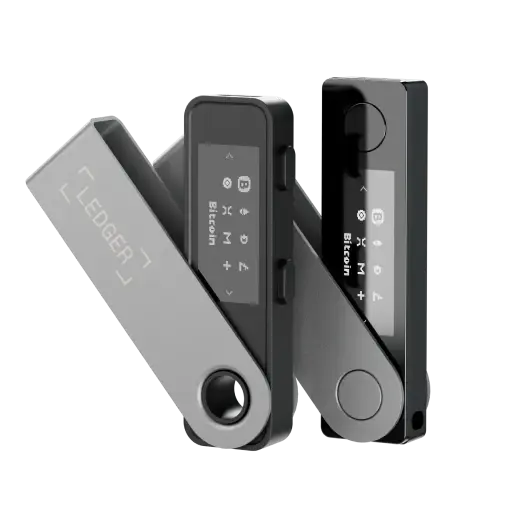
A Ledger signer keeps your private keys offline*, far from the reach of hackers and malware. Pair it with the Ledger Wallet app for full control over your Tether holdings, with every action verified on-device.

Ledger Wallet™ App

Do more with your USDT: track balances across networks, compare buy and swap rates, and move between ERC20 and TRC20 to optimize fees, all in one place*, with private keys staying inside your hardware signer.

How to get a USDT wallet?

1
Get a Ledger device

Get a Ledger device

Choose the certified secure Ledger device that fits your lifestyle. Every Ledger signer protects your private keys with a Secure Element chip and the constantly updated Ledger OS™.

  • Prefer a secure touchscreen? Explore the Ledger Flex™ or the premium Ledger Stax™. Their E Ink displays show full transaction details on-device, so you can verify exactly what you are signing.
  • Beginner or on-the-go user? Start with the Ledger Nano X (Bluetooth-enabled, mobile-friendly) or the compact Ledger Nano S Plus.

Choose your hardware device

2
Download the Ledger Wallet™ app

Download the Ledger Wallet™ app

Download and install the Ledger Wallet™ app on your desktop or mobile device. Paired with a Ledger signer, the app becomes your interface to a fully self-custodial USDT wallet, with private keys remaining isolated in cold storage*.

3
Add your USDT account and start managing

Add your USDT account and start managing

Because Tether USD lives on multiple blockchains, you’ll add an Ethereum account for ERC20 USDT, a Tron account for TRC20 USDT, or both. From there, send, receive, and manage all your stablecoins from the app*, always with self-custody and on-device confirmation. Verify the network before any transfer: sending ERC20 tokens to a TRC20 address (or vice versa) results in permanent loss.

One of the best ways to keep your Tether secure

Compare our wallets

Buy, manage & swap USDT

Manage your Tether (USDT)

Manage your Tether (USDT)

The Ledger Wallet app gives you one dashboard for your USDT balance across Ethereum, Tron, and Polygon. Track portfolio performance, review full transaction history, and compare network fees side-by-side before sending. Every action requires physical confirmation on your Ledger signer before it is broadcast to the chain.

Buy Tether

Buy Tether

Buy Tether through the Ledger Wallet app using a credit/debit card or bank transfer. Ledger gives you access to third-party payment providers such as MoonPay and Ramp, so you can compare providers and pick the best rate. Your USDT is secured right away with your hardware wallet, with no detour through an exchange wallet and no gap between purchase and self-custody.

Buy USDT

Swap USDT

Swap USDT

You can swap BTC, ETH, or other crypto into USDT through integrated third-party providers, without sending funds back to a centralized exchange. You can also move USDT between networks (for example from ERC20 to TRC20 to save on gas) through the app. 

Swap crypto

What is a USDT wallet?

A USDT wallet is a tool that lets you interact with Tether on the blockchain. Importantly, the wallet does not actually hold your USDT. The tokens live on-chain. What it stores are your private keys: the cryptographic credentials that prove ownership and authorize transactions on your behalf.

Before choosing a wallet, it is worth understanding what Tether (USDT) is and how it functions as a stablecoin. Once your wallet is set up, you can buy USDT through Ledger’s third-party providers and have it sent directly to your secure device.

How does a USDT wallet work?

Every wallet is built around two keys:

  • A public key, which generates the address you share to receive funds. Think of it as your bank account number: visible to anyone who needs to send you USDT, with no risk attached to sharing it.
  • A private key, which authorizes outgoing transactions. Think of it as the password to your bank account, with one critical difference: there is no “reset” if it is lost or stolen.

Whoever holds the private key controls the USDT. That is why where the key lives matters more than the interface around it. A key on a phone, a key on a server, and a key on a dedicated offline device offer very different security guarantees. With Ledger, the key is generated and stored inside the Secure Element of your hardware signer and stays offline by default*.

Different types of USDT wallets

USDT wallets fall into three categories, defined by who holds the keys and where:

  • Exchange wallets (custodial). When you keep USDT on centralized exchanges, the platform holds the keys. You are trusting them not to lose, freeze, or misuse your assets. Convenient for active trading; risky for long-term holding, as exchange insolvencies and withdrawal halts have demonstrated repeatedly.
  • Software wallets (non-custodial, hot). Software wallets put the keys on your device, so you control them. The catch is that the keys are exposed whenever the device is online. Phone malware, malicious browser extensions, and phishing pages all target this surface.

Hardware wallets (non-custodial, cold). Ledger and similar devices keep the keys on a dedicated offline chip. Transactions are signed inside the device; only the signed result leaves it. Online attack vectors that target hot wallets would have nothing to extract.

Exchange wallet Software wallet Hardware wallet
Who holds the keys The platform You (on-device) You (offline chip)
Internet exposure Always online Always online Offline by default*
Risk profile Platform insolvency, freezes, hacks Malware, phishing, clipboard attacks Physical loss, user error
Cost Free Free One-time purchase
ERC20 + TRC20 support Varies by exchange Most major wallets Ledger: both natively
Best for Active trading Small daily amounts Savings & long-term holding

A capable USDT wallet should also support the networks you actually use. At minimum, that means ERC20 (Ethereum) for DeFi compatibility and TRC20 (Tron) for low-fee transfers. Ledger handles both natively, plus Polygon and other networks where USDT is issued.

Are these solutions free?

Software wallets and exchange accounts are free to set up, but the argument could be made that you pay by accepting the risk of attack that comes with them. Phishing sites, wallet drainers, fake browser extensions, and SIM-swap attacks have collectively stolen billions of dollars from hot-wallet users.

A hardware wallet is a one-time purchase. For anyone holding meaningful amounts of USDT, the cost is small relative to what it protects: a single hot-wallet drain typically wipes out far more than the price of a Ledger device. Treat it the way you would home insurance: a fixed cost that is small  compared to the loss it prevents.

How to choose the best USDT wallet?

Pick your wallet by the size and purpose of the position you are securing.

For small amounts you are actively spending or trading, a software wallet may be sufficient. For USDT you are holding as savings (emergency funds, stablecoin treasury reserves, long-term allocation away from market volatility), cold storage is the standard. The cost of a hardware wallet is, in practical terms, an insurance premium on the balance it protects.

If you move USDT across multiple chains, prioritize a wallet that supports both ERC20 and TRC20 natively, so you are not juggling separate apps for each network. The Ledger Wallet app combines ERC20, TRC20, Polygon, and other networks in a single interface, all secured by the same hardware signer.


*More info on how private keys are stored offline can be found here. USDT transaction services are provided by third-party service providers. Ledger provides no advice or recommendations to use any of these third-party services. The availability of such third-party services may vary based on jurisdiction.

Chosen by 8,000,000+ customers

“Ledger = peace of mind. I'm sure some of us know that unsettling feeling when you know you need a Ledger but haven't quite organized yourself to get it sorted. If I did it all again, I'd start with having a Ledger.”

Janet Onagah @Janet_Oganah

"I got hacked in January and lost 1000s worth of NFTs. I felt disgusted, lost, and willing to quit. Until my friend told me he's ordering a Ledger. So, we bought the duo deal. Since then, I've been sleeping."

PrimeNic.eth @primenic_eth

“I use multiple Ledgers. Different colours = different uses.Public Wallet. Never touch long term storage. Day to day fund holdings. A back up just in case.”

winny.eth @winnyeth

"I have 3 Ledgers. Hot Wallet: minting/drawings etc. Main wallet: store most NFTs. Vault wallet: cold storage of crypto."

2160 @rekt2160

“I have 5 Ledger total. My personal NFT bag. 1 for testing. And 1 for each of my 3 daughters.”

Fanzo 🧢 11.11.22 @iSocialFanz

"If I could, I would name my Ledger Hagrid. Cause it's the keeper of my keys."

Petrica Butusina @PetricaButusina

"My Ledger is already called "Stew". As it is the steward who looks after my crypto & NFTs, so I can sleep at night."

Lkmland Crypto 💫 @LkmlandCrypto

"Ledger makes cold storage downright easy. My NFTs land infinitely safer and I don’t have to feel as paranoid about connecting to new smart contracts."

Matt Oney @MattOney93

Cryptocurrencies similar to Tether supported by Ledger crypto wallets

Bitcoin, Ethereum, USDT, Solana and more…

FAQ

Find answers to some of the most common questions.

To receive USDT, open the Ledger Wallet app, select the account that matches the network you’re receiving on (Ethereum for ERC20, Tron for TRC20, Polygon for Polygon-native USDT), and copy the address. Always verify the address on your Ledger signer’s screen before sharing it.

Critical: USDT addresses look very different across networks. ERC20 addresses start with 0x, while TRC20 addresses start with T. Sending tokens to the wrong network results in permanent loss of funds. Confirm the sender is using the same network you are receiving on before any transfer.

USDT is a centralized stablecoin issued by Tether Limited, which has the technical ability to freeze addresses at the smart-contract level. Ledger secures your keys, meaning no one can move your USDT without your physical confirmation on the device. However, Ledger cannot override Tether’s contract controls or guarantee the composition of Tether’s reserves.

On the transparency front, in March 2026 Tether announced it had engaged a Big Four accounting firm to conduct its first full independent financial statement audit, moving beyond the periodic attestations it has used since 2021. The audit is ongoing and the firm has not been publicly named. Until it is completed, USDT users continue to rely on Tether’s quarterly attestations rather than a full audit opinion.

It depends on the use case.

  • TRC20 (Tron) is cheaper and faster, with transaction fees usually a fraction of a cent. A good default for transfers, remittances, and exchange withdrawals.
  • ERC20 (Ethereum) is the most widely supported network in DeFi (lending, yield, swaps). Higher gas fees, but unmatched protocol coverage.
  • Polygon and other networks sit between the two, with low fees and growing DeFi support.

The Ledger Wallet app supports all of them in one place, so you can hold balances on multiple networks and route each transaction through whichever is cheapest or most useful at the time.

Yes. You can add separate Ethereum and Tron accounts inside the Ledger Wallet app and manage USDT on either network, or both, from one interface. All transaction signing happens on your Ledger hardware signer, regardless of which network you’re using.

  • ERC20 addresses typically start with 0x.
  • TRC20 addresses typically start with T.

Always confirm the sender’s network matches the receiving address; sending across networks results in lost funds.

Yes. The Ledger Wallet app lets you swap USDT for other crypto assets through trusted third-party providers, without converting to fiat first. Useful for diversifying out of stablecoins or hedging against volatility, all while your private keys stay inside your Ledger signer*.

Every Ledger signer (Flex, Stax, Nanos) uses a certified Secure Element chip to keep private keys offline. Transactions are signed inside the device and physically confirmed on its screen. This is the same chip class used to secure passports and payment cards.

Generate a receive address in the Ledger Wallet app on the network that matches the exchange’s withdrawal network (most exchanges let you choose between ERC20, TRC20, or others). Verify the address on your Ledger signer’s screen, send a small test amount first, confirm it arrives in your Ledger account, and then transfer the full balance.

Your funds aren’t on the device. They’re on the blockchain, and your access is backed up by your 24-word Secret Recovery Phrase. If you lose or damage your Ledger signer, restore the same accounts on a new device using the phrase. If the recovery phrase is safe and private, your USDT is safe.

The USDT wallet address format depends on the blockchain: Ethereum (ERC-20) addresses are 40-character hexadecimal strings starting with “0x”, while Tron (TRC-20) addresses begin with “T” followed by alphanumeric characters.

To receive USDT, open the Ledger Wallet app, select the account that matches the network you’re receiving on (Ethereum for ERC20, Tron for TRC20, Polygon for Polygon-native USDT), and copy the address. Always verify the address on your Ledger signer’s screen before sharing it.

Critical: USDT addresses look very different across networks. ERC20 addresses start with 0x, while TRC20 addresses start with T. Sending tokens to the wrong network results in permanent loss of funds. Confirm the sender is using the same network you are receiving on before any transfer.

USDT is a centralized stablecoin issued by Tether Limited, which has the technical ability to freeze addresses at the smart-contract level. Ledger secures your keys, meaning no one can move your USDT without your physical confirmation on the device. However, Ledger cannot override Tether’s contract controls or guarantee the composition of Tether’s reserves.

On the transparency front, in March 2026 Tether announced it had engaged a Big Four accounting firm to conduct its first full independent financial statement audit, moving beyond the periodic attestations it has used since 2021. The audit is ongoing and the firm has not been publicly named. Until it is completed, USDT users continue to rely on Tether’s quarterly attestations rather than a full audit opinion.

It depends on the use case.

  • TRC20 (Tron) is cheaper and faster, with transaction fees usually a fraction of a cent. A good default for transfers, remittances, and exchange withdrawals.
  • ERC20 (Ethereum) is the most widely supported network in DeFi (lending, yield, swaps). Higher gas fees, but unmatched protocol coverage.
  • Polygon and other networks sit between the two, with low fees and growing DeFi support.

The Ledger Wallet app supports all of them in one place, so you can hold balances on multiple networks and route each transaction through whichever is cheapest or most useful at the time.

Yes. You can add separate Ethereum and Tron accounts inside the Ledger Wallet app and manage USDT on either network, or both, from one interface. All transaction signing happens on your Ledger hardware signer, regardless of which network you’re using.

  • ERC20 addresses typically start with 0x.
  • TRC20 addresses typically start with T.

Always confirm the sender’s network matches the receiving address; sending across networks results in lost funds.

Yes. The Ledger Wallet app lets you swap USDT for other crypto assets through trusted third-party providers, without converting to fiat first. Useful for diversifying out of stablecoins or hedging against volatility, all while your private keys stay inside your Ledger signer*.

Every Ledger signer (Flex, Stax, Nanos) uses a certified Secure Element chip to keep private keys offline. Transactions are signed inside the device and physically confirmed on its screen. This is the same chip class used to secure passports and payment cards.

Generate a receive address in the Ledger Wallet app on the network that matches the exchange’s withdrawal network (most exchanges let you choose between ERC20, TRC20, or others). Verify the address on your Ledger signer’s screen, send a small test amount first, confirm it arrives in your Ledger account, and then transfer the full balance.

Your funds aren’t on the device. They’re on the blockchain, and your access is backed up by your 24-word Secret Recovery Phrase. If you lose or damage your Ledger signer, restore the same accounts on a new device using the phrase. If the recovery phrase is safe and private, your USDT is safe.

The USDT wallet address format depends on the blockchain: Ethereum (ERC-20) addresses are 40-character hexadecimal strings starting with “0x”, while Tron (TRC-20) addresses begin with “T” followed by alphanumeric characters.

Related Resources

Stay in touch

Announcements can be found in our blog. Press contact:
[email protected]

Subscribe to our
newsletter

New coins supported, blog updates and exclusive offers directly in your inbox


Your email address will only be used to send you our newsletter, as well as updates and offers. You can unsubscribe at any time using the link included in the newsletter. Learn more about how we manage your data and your rights.