
Introducing Ledger Agent Intent

| KEY TAKEAWAYS: |
| — Ledger Agent Intent is the next third-party tool addition to Ledger’s security stack for artificial intelligence (AI) agents. — Ledger Agent Intent lets agents propose actions within policies you set, while you approve each one on your Ledger signer, where your private keys are designed to stay. — An agent such as OpenClaw can check balances, prepare swaps, or rebalance staking positions, while actions that move funds are designed to wait for your approval on your Ledger signer. |
Agentic AI is moving from answering questions to completing tasks. Tools like OpenClaw, an open-source agent that acts as a digital employee on your own computer, and Meta’s Muse, which can send emails and book travel, show how quickly that shift is happening.
For crypto users, the potential is significant too. In an agentic wallet, an AI agent watches markets around the clock and prepares transactions, payments, and routine portfolio tasks within parameters you set.
AI is already acting on your behalf. The question is whether you control what it does. Ledger Agent Intent is built to give you that control, and it is one layer of the Ledger Agent Stack described in Ledger’s 2026 AI Security Roadmap.
To be useful, an agent needs access to the things it acts on, such as email, files, credentials, and wallets, and that same access makes mistakes and manipulation costly. The Agent Stack answers with one principle. Agents propose. You approve. Your Ledger signer enforces.
What is Ledger Agent Intent?
Think of each suggestion from Ledger Agent Intent as a proposal, not a transaction. When operating within the policy that you set, your agent can propose transactions that align with your overall goals, such as spending limits or specific transaction types. Each proposal is designed to require physical confirmation on your Ledger signer, the device that keeps your private keys offline, before the transaction is broadcast to the blockchain.
You still have to review the proposal, and the transaction is designed not to move forward until you do. The proposal appears in the Ledger Agent Intent interface. Confirming it happens on your Ledger signer itself, the same action required for any transaction.
Ledger Agent Intent gives every request for your approval one place to land. Your agents keep working on everything else, and each proposal waits in your queue until you are ready to review it. If you run several agents, their requests arrive in the same queue.
Your AI agent can watch for the conditions you care about and prepare the matching action, whether that is a swap when a price you chose is reached, a staking position that needs rebalancing, or funds that are ready to collect. It can be as aggressive or reserved as you prompt it. It isn’t realistic to sit in front of a computer all hours of the day, waiting for an opportunity to align with your goals, so you don’t have to. Your agent waits until an opportunity or task comes up, and then proposes the transaction on your behalf. All you have to do is decide if you want to confirm it.
That really is the point behind an intent: getting the benefit of an AI agent that knows your goals and handles the legwork for you, while you remain the final approval.
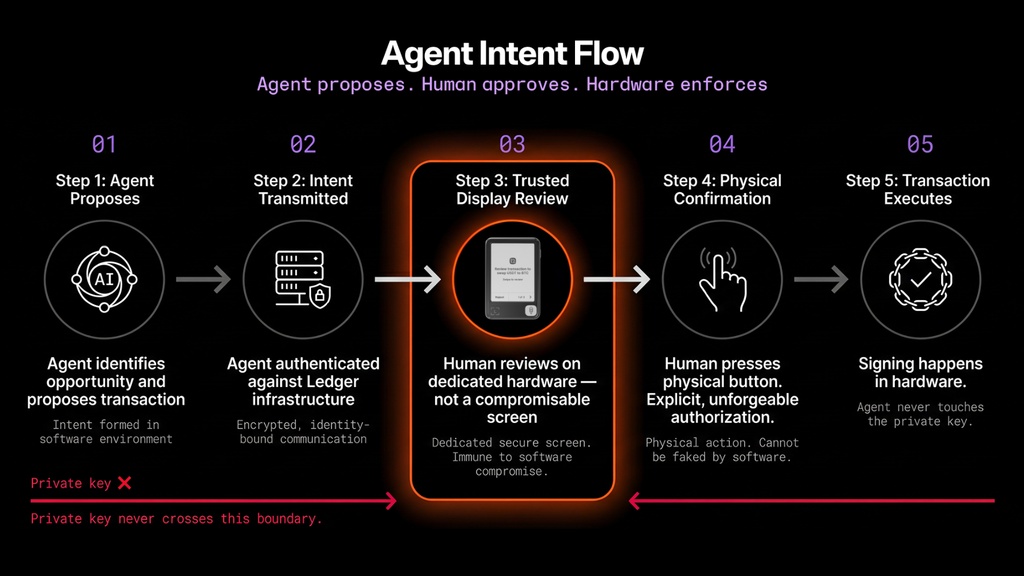
How Ledger Agent Intent Bridges AI & Self-Custody
When two technologies come together, the fit is rarely seamless. On one end, there is AI, in the form of agents like OpenClaw and Muse, powerful tools that can speed up analysis, complete tasks, and work at all hours of the day. On the other is self-custody: hardware-enforced security that requires human approval.
Until now, giving agents full control over your assets often meant exposing your private keys, and ultimately giving them the final say in decisions that should remain yours alone.
The risks are not hypothetical, and they are not limited to crypto. In February 2026, a Meta AI alignment director reported that an AI agent connected to her inbox and attempted to delete emails, even though she had told it to seek approval first and then sent repeated commands to stop.
Access to a laptop carries its own risks. A security audit of a popular marketplace for agent add-ons called Skills found 341 malicious skills among 2,857. Some were disguised as crypto wallet tools and were built to steal wallet private keys, exchange API keys, SSH credentials, and browser passwords.
Even routine actions such as reading a file or checking email can become the entry point for a hidden malicious instruction, a technique known as prompt injection. None of this means agents are not worth using. It means final approval should stay with you, on a device the agent is not designed to control.
This is the gap that Ledger Agent Intent bridges. You can take advantage of self-custody and the benefits that come with it, while also allowing your unique AI agent to do some of the manual work, such as analyzing the market or preparing routine transactions, and making proposals based on your specific goals. The agent proposes; you decide what gets signed.
Where Ledger Agent Intent Fits in the Agent Stack
Ledger Agent Intent is built on Ledger Agent Stack, a comprehensive open toolkit that has been live since July 2026.
In April 2026, Ledger published its 2026 AI Security Roadmap, laying out exactly how that stack fits together. The idea behind it is simple: You should be able to benefit from AI agents while maintaining hardware-anchored security.
From the Device Management Kit (DMK) to Agent skills and Transaction Check, Ledger Agent Intent is simply the next piece of the same roadmap.
Already live
- Device Management Kit skills (DMK): Allows developers to securely connect different software, such as an AI agent, to a Ledger signer. This allows anyone with a Ledger signer to benefit from their software without compromising security. With the DMK skills, developers can now integrate in minutes instead of days.
- Transaction Check: Reviews your transaction and flags any detected scams before you sign.
- Clear Signing: Shows the full details of a transaction on the Secure Screen on your Ledger signer, so that what you see is what you sign.
- Agent Skills and Command Line Interface (CLI): Secured through the Ledger Keyring Protocol, this gives agents and developers programmable access to Ledger signers’ key functions such as send, swap, earn, and monitor*. Agents propose. You approve. Your Ledger signer enforces.
- Security Key (FIDO2): Your Ledger signer becomes your hardware authenticator for services such as GitHub, npm, 1Password, and Discord. Agents can use sessions you have already opened, and Ledger Security Key is designed so that they cannot start new ones on their own. A human has to be there to open the session.
- OpenPGP: Your Ledger signer holds the private key that decrypts sensitive material such as API tokens, environment variables, and credentials. In tap-required mode, OpenPGP is designed so that every decryption needs your physical confirmation. OpenPGP is for advanced users. The app is aimed at developers already comfortable with OpenPGP and GnuPG, and keys do not automatically persist across devices, operating system updates, or app reinstalls. Back them up using the instructions in the app-openpgp repository, or you risk losing access to anything encrypted against them.
The next layer in the stack
Agent Intent: Agents propose actions based on the parameters that you set (your intents), and you review them via your Ledger signer in your own time. A transaction is designed not to be broadcast without your signature. You stay in control of each step of the process, while still benefiting from your AI agent handling the legwork and proposing transactions on your behalf. Ledger Agent Intent is now live for everyone, in beta.
Agent Policies: Your parameters are enforced through hardware-anchored rules. You define the parameters in which your AI agent can perform transactions, such as spending no more than $500 a day or only interacting with three approved smart contracts. If your agent tries to act outside those parameters, the action is routed back to you for approval.
With policies, you sign the rules once, and you don’t have to manually approve each transaction within the bounds you pre-authorize. For businesses that manage many agents at once, these rules can be enforced inside a Hardware Security Module (HSM), so one set of boundaries applies across an entire fleet of agents.
Proof of You™: Helps ensure that important actions are approved by the real user. AI agents are becoming harder to distinguish from real people, but a physical confirmation on your Ledger signer is far harder for a bot to replicate, since it is designed to require your approval for the transaction. Verification at the hardware level helps platforms prevent multiple accounts and bot spam.
Ledger’s hardware architecture remains the underlying technology at the heart of these developments. The Secure Element chip is designed to generate and store your private keys offline, and away from threats.
What Ledger Agent Intent Means for Anyone Who Owns a Signer
Ledger Agent Intent follows the principle that runs through the whole Agent Stack. Agents propose. You approve. Your Ledger signer enforces. For anyone who already owns a Ledger signer, that plays out in three ways.
- Agents propose, with no new hardware. Your agent prepares proposals within the parameters you set. Ledger Agent Intent is available on every compatible Ledger signer, so it works with the one you already own. The one exception is the Ledger Nano S™, which doesn’t support it.
- You approve, and the process stays the same. What changes is the agent’s ability to submit a proposal for your review, not the nature of confirming and signing a transaction itself. Say your agent notices that a staking position needs rebalancing. It prepares the move and sends it to you as a proposal. You review the details on the Secure Screen on your Ledger signer and confirm or reject it on the device. If you confirm, the transaction is signed and broadcast the same way as any transaction you start yourself. If you reject, the transaction is not signed.
- Your Ledger signer enforces, and private key isolation stays the same. Your private keys stay isolated on your Ledger signer, and neither the software nor the AI agent is designed to have access to them.
Who holds authority does not change. Only who or what can propose does.
Pay.sh: From Secure to Unblocked to Autonomous
Pay.sh, a payments gateway from the Solana Foundation and Google Cloud, lets AI agents discover, access, and pay for APIs with stablecoins on Solana. It also shows how an agent setup matures as Ledger comes in. It started with a software wallet, which was convenient but meant the agent held real keys. From there, it moves through three stages.
- Secure. Adding Ledger moved the keys to hardware, but the agent stopped to wait for you each time it needed a signature.
- Unblocked. With Ledger Agent Intent, the agent keeps working on everything else, and only the payment waits in your queue.
- Autonomous. With a rule you approve once, the agent pays on its own inside the rule. Outside it, the action is routed back to you for approval.
How Do You Get Started With Ledger Agent Intent?
To get started with Ledger Agent Intent, point your AI agent to the Ledger Agent Intent guide on the Ledger Developer Portal, let it install the official Ledger skill, and register it with your Ledger signer. Setup takes three steps, and Ledger Agent Intent is designed so that your agent does not need access to your private keys.
Ledger Agent Intent is live for everyone and currently in beta. Supported actions, behavior, and URLs can change without notice, and the transactions you approve are real on-chain transactions that are generally irreversible. Until the beta ends, connect Ledger Agent Intent only to non-critical workflows and low-value accounts.
What You Need
- A compatible Ledger signer. Ledger Agent Intent is free and compatible with Ledger NanoTM Gen5, Ledger Flex™, and Ledger Stax™. Keep the device on the latest Ledger OS™.
- Ledger Sync. An existing Ledger Sync setup can be reused. If Ledger Sync is not active yet, Ledger Agent Intent sends you to the Ledger Wallet™ app to turn it on before you continue. The Ledger Sync device app, version 1.3.0 or later, installs automatically during onboarding.
- A supported browser. Chrome, Edge, and Brave can connect to your Ledger signer over WebHID or Web Bluetooth. Safari and Firefox cannot.
- An AI agent. Background agents such as OpenClaw, Hermes, Grok Bot, Muse, and Dots work on their own, and when they need to act, you approve on your Ledger signer in your own time. Coding agents such as Claude Code, Cursor, and Codex are good examples for Ledger Agent Stack, which includes the Ledger Wallet CLI and DMK skills. If you want private, model-agnostic routing for your agent, you can also use Venice AI, a privacy-focused AI service, through its API.
- A low-value account. Use a dedicated account for the beta, not a high-value one.
Set Up Your Agent in Three Steps
- Point your agent to the guide. Ask your agent to follow the Ledger Agent Intent guide on the Ledger Developer Portal. The agent installs the official Ledger skill, creates its own identity key pair, and gives you a registration link that contains only its public key. Tell the agent to use only the official skill.
- Register the agent. Open the registration link and sign in with Ledger Sync. Allow the agent to send intents, then connect your Ledger signer. Your signer shows the Agent ID, a short fingerprint of the agent’s public key. Compare it with the Agent ID your agent gave you, character by character, and approve the registration on your signer only if they match. Finally, allow the agent to see your Ledger accounts so it can prepare proposals based on your portfolio.
- Review what your agent proposes. Keep using the agent for its normal role. When it finds a transaction worth proposing, it creates an intent and sends you a review link. The request waits in your queue until you are ready. Check the details on the Secure Screen on your Ledger signer, then approve or reject with physical confirmation.
Developers and terminal users can also run npx skills add ledgerhq/agent-skills or install the Ledger Wallet CLI directly with a compatible Ledger signer.
What Your Agent Can and Cannot Do
Every agent you register has its own identity key pair, and the agent’s secrets are designed to stay in its own environment. Before a proposal reaches you, the agent signs it with that key pair, which shows which registered agent sent it. That signature identifies the agent. It does not approve the transaction.
A registered agent is designed not to be able to register another agent, change the record of registered agents, sign a transaction, or broadcast one without your approval. Your Ledger signature gives the final approval, and you review the transaction with Clear Signing and Transaction Check before you give it.
Stay Safe While You Review
- Trust the Secure Screen on your Ledger signer, not the agent’s description. The amount, recipient, and fees shown on your Ledger signer are what you sign. The description an agent writes is text the agent controls, so reject the request if the two disagree.
- Check the full recipient address. Address poisoning attacks rely on you checking only the first and last characters, so read the whole string.
- Never share your Secret Recovery Phrase or private keys with an agent. The agent uses a separate identity key pair. Treat any request for your 24 words as a sign of a scam.
- Assume an agent can be manipulated. A compromised agent is designed not to be able to sign or move funds, but it can still propose a transaction that looks reasonable. Your review is the control.
What’s Next for Ledger Agent Intent
The term “not your keys, not your crypto” remains one of the most fundamental principles in blockchain technology. Ledger Agent Intent lets you benefit from the power of AI technology, with agents proposing actions that might make your life easier or more profitable without asking you to set that security principle aside. Private key isolation remains in the Ledger signer. You shouldn’t have to give up control to benefit from advancements in technology.
As AI and crypto continue to converge, the choices made early on will be the foundation for what comes next. Ledger’s 2026 roadmap is built on hardware-anchored security. Each new layer, from Agent Intent and Policies to Proof of You™, extends that foundation rather than replacing it. Ledger Agent Intent is only the latest advancement in changing technologies and is designed with security at the forefront of any changes.
Agents will keep getting more capable, and the work they can take on will keep growing. The principle behind Ledger Agent Intent stays constant. Agents propose, you approve, signers enforce.
Ledger Agent Intent is available on every compatible Ledger signer, at its best on Ledger Atom™, with OpenClaw integrated from day one. Ledger Atom was revealed at Ledger Op3n on October 15, 2026.
Ledger Agent Intent FAQs
Does the AI agent hold the crypto?
The AI agent does not hold or own your crypto. It can analyze your wallet addresses on the blockchain and track market trends to propose transactions on your behalf. It is designed not to be able to sign or execute those transactions on its own.
Where are my private keys?
Your private keys are designed to stay on your Ledger signer, and you hold your Secret Recovery Phrase. Using Ledger Agent Intent does not change how your crypto is secured. Your private keys stay isolated on your Ledger signer.
Do I need a Ledger signer to use Ledger Agent Intent?
Yes, Ledger Agent Intent is available on every compatible Ledger signer, including Ledger NanoTM Gen5, Ledger FlexTM, and Ledger StaxTM. It is not supported on the Ledger Nano STM. This gives you the benefit of using an AI agent while keeping private key isolation within your Ledger signer.
Does Ledger build or provide the AI agent itself?
No, Ledger does not build the AI agent. You can connect your existing AI agent to Ledger Agent Intent to receive the benefits of your Ledger signer along with an AI agent analyzing market trends and proposing transactions that fall within your intents.
What happens if I reject a proposal?
If you reject a proposal, the transaction is not signed or broadcast, and the proposal is removed from the queue. While the AI agent can propose transactions, you have the final say on whether to approve them.
Can I have more than one AI agent at the same time?
You can set up and use more than one AI agent together. Set up each agent by defining the parameters and confirming the setup on your Ledger signer.
Which AI agents work with Ledger Agent Intent?
Ledger Agent Intent and Ledger Agent Stack work with agents that can act on your behalf. Background agents such as OpenClaw, Hermes, Grok Bot, Muse, and Dots work on their own, and when they need to act, you approve on your Ledger signer in your own time. Coding agents such as Claude Code, Cursor, and Codex are good examples for Ledger Agent Stack, which includes the Ledger Wallet CLI and DMK skills. For private, model-agnostic routing, you can also use Venice AI through its API. New agents launch all the time, and agents with terminal access can use Ledger Agent Stack out of the box.
Is Ledger Agent Intent free, and is it ready to use?
Ledger Agent Intent is live for everyone and free to use, and it is currently in beta. Supported actions, behavior, and URLs can change without notice, so use it with non-critical workflows and low-value accounts only. Standard network and third-party provider fees may apply to transactions your agent proposes.
Disclaimer:
*Crypto transaction services are provided by third-party providers. Ledger provides no advice or recommendations on use of these third-party services.
Crypto transaction services referenced or facilitated through Ledger Agent Intent are provided by third-party service providers. Any AI agent used in connection with Ledger Agent Intent is also a third-party tool and is not provided, operated, or endorsed by Ledger. Ledger provides no financial advice or recommendations on the use of these third-party services or any AI agent. For more info, please visit Ledger Agent Intent
Ledger Atom™ is still in development. Specifications, features, design, appearance, and price may change before launch.
