



All supported crypto



Stake your Cardano securely and earn 1–3% APY*
Staking Cardano lets you earn passive rewards while helping secure the network, all without giving up control of your assets. Most staking platforms take custody of your ADA to stake it on your behalf. Ledger doesn't when you stake through Ledger Wallet. Your Cardano stays on the blockchain, your private keys stay on your hardware device, and you earn 1–3% APY — without handing control to a third party*.
**Disclaimer: Crypto transaction services are provided by third-party providers. Ledger provides no advice or recommendations on use of these third-party services. Rewards and payout frequency are not guaranteed. Ledger does not provide any financial advice or recommendations.

WHY STAKE YOUR CARDANO?
Cardano uses a Proof of Stake consensus mechanism. By staking your Cardano, you actively contribute to network security and decentralization — and earn rewards in return.
Earn 1–3% APY*
Put your ADA to work through staking and get the chance to earn 1–3% a year*. Earning rewards every ~5 days, without selling a single token. The exact yield varies based on network conditions and your validator's commission rate.
Stake directly on-chain
By staking via Ledger Wallet*, your ADA participates directly in the Cardano network. Not through a platform holding your assets on your behalf. You're staking, not lending.
Keep full custody
Your private keys are stored on your Ledger hardware device, not on a platform's server. When you delegate, you sign the transaction on your device. The validator participates in consensus on your behalf — but holds no keys and controls no assets. Your ADA stays on the Cardano blockchain, associated with your address.
Why stake Cardano (ADA) via Ledger
Cold staking security
Pairing your Ledger with a third-party wallet, allow you to grow your Cardano securely.
Access the ecosystem on your terms
Keep full custody of your assets when you stake with Yoroi wallet or AdaLite, unlike with crypto exchanges. Whichever option you choose, the transaction is confirmed on your hardware device. The flexibility of the ecosystem, with hardware-level security on every action.
Your validator, your choice
On most staking platforms, the platform selects the validator on your behalf. Through Ledger Wallet, you choose. Compare commission rates, uptime history, and track records, then delegate to whichever validator meets your criteria*. Your delegation isn't tied to a single option; you can review and switch as conditions change.

Stake Cardano and earn 1–3% APY*
When you delegate your Cardano to a validator via the Ledger Wallet app, that validator participates in securing the Cardano blockchain. The Cardano protocol distributes block rewards to validators in return — a portion of which is passed on to delegators proportional to their stake, minus the validator's commission rate.
The current estimated annual yield for Cardano staking is approximately 1–3%. This figure varies with network participation levels and your chosen validator's commission. Rewards are credited every ~5 days. When comparing validators, the key variables are commission rate, uptime history, and total stake. On some networks, an over-staked validator can dilute individual rewards.
You can un-delegate your Cardano at any time through the Ledger Wallet app. Most networks apply an un-bonding period after un-delegation — a set number of days during which your ADA cannot be transferred and does not accrue rewards. On networks where slashing is active, a validator misbehaving can result in a partial loss of delegated funds: another reason to choose your validator carefully.
Estimate Cardano staking rewards
HOW DOES LEDGER'S SOLUTION WORK?
Get your deviceA hardware wallet
that offers the best security for your crypto and NFTs - your assets always remain safe.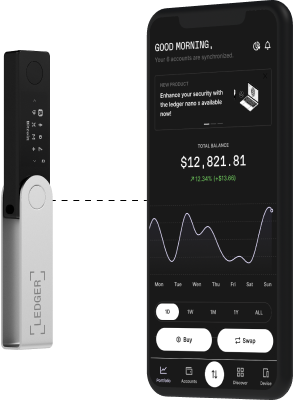
An app
to manage your crypto and access key services: buy, swap or grow your assets. Securely thanks to your hardware wallet.5 STEPS TO START SECURELY STAKING CARDANO
01
Buy a Ledger hardware wallet
A Ledger hardware device does two things: it stores your private keys on dedicated offline hardware, and it physically signs every transaction. No action, staking or otherwise, can proceed without your confirmation on the device itself.
02
Set up your device
Follow the setup steps in the Ledger Wallet app and create a Cardano account on your device.
03
Download and install a third-party-wallet
Download and install a Yoroi wallet or AdaLite extension that lets you manage your Cardano.
04
Connect your Ledger Nano to your third-party-wallet
- Connect your Ledger Nano to a computer/smartphone and unlock it.
- Open your wallet extension.
- Connect your third-party wallet to Ledger Nano.
LEDGER LIVE
Other crypto to stake with Ledger

ATOM*
ATOM
Ethereum
ETH
EOS
EOS
Hedera
HBAR
Axelar
AXL
NEAR*
NEAR
Tron
TRX
Mina Protocol
MINA
dYdX
DYDX
Cronos
CRO
Oasis Network
ROSE
Polkadot
DOT
Solana*
SOL
Stacks
STX
Avalanche
AVAX
Osmosis*
OSMO
Algorand
ALGO
Internet Computer
ICP
EGLD*
EGLD
Casper Network
CSPR
Kusama
KSM
NEO
NEO
MANTRA
OM
Tezos
XTZ*Ledger validator node available
Want to learn more about staking?
We answer all the basic questions you might have in our Ledger academy: What is staking? What’s
the difference
between Proof-of-Stake and Proof-of-Work? What is a validator?
You can also take a look at our School of Block series on Youtube to learn how to get started in staking
and make your
money work for you.

What is staking
Read the article
School Of Block
See our episode about staking
What is proof of stake
Read the article