



All supported crypto



Stake your Stacks securely and earn 3–5% APY*
Staking Stacks lets you earn passive rewards while helping secure the network, all without giving up control of your assets.
Through Hiro wallet, and by pairing it with your Ledger hardware wallet, you can easily and securely delegate STX you want to stake.
Your Stacks stays on the blockchain, your private keys stay on your hardware device, and you earn 3–5% APY — without handing control to a third party*.
**Disclaimer: Crypto transaction services are provided by third-party providers. Ledger provides no advice or recommendations on use of these third-party services. Rewards and payout frequency are not guaranteed. Ledger does not provide any financial advice or recommendations.

WHY STAKE YOUR STACKS?
Formerly known as Blockstack, Stacks is a layer-1 blockchain solution designed to enable smart contracts and decentralized applications (DApps) on Bitcoin (BTC) without compromising any of its inherent strengths, such as security and stability.
These open and modular DApps allow developers to create unique features that are not possible with traditional apps. Since Stacks is built on top of Bitcoin, all network activity is settled on the most widely used and secure blockchain.
The Stacks 2.0 blockchain is powered by the Stacks token (STX), which is used for executing smart contracts, processing transactions, and registering new digital assets.
Maximise your Bitcoin assets
Put your STX to work through staking and get the chance to earn 3–5% a year*. Earning rewards every ~2 weeks, without selling a single token. The exact yield varies based on network conditions and your validator's commission rate.
Keep full custody
Your private keys are stored on your Ledger hardware device, not on a platform's server. When you delegate, you sign the transaction on your device.
STACKS STAKING IS BETTER WITH A WALLET APP THAT SUPPORT COLD STORAGE
Cold staking security
Pairing your Ledger with a thrid-party wallet, allow you to grow your Bitcoin securely.
Ownership
Keep full custody of your assets when you stake Stacks with the Hiro wallet, unlike with crypto exchanges.
Freedom of choice
It's up to you to choose which validators you want to stake your Stacks tokens.

Earn Bitcoin via Stacks
When you Stack your STX — locking it temporarily to help secure the Stacks network — you earn Bitcoin as a reward. This is how Stacking works: miners spend BTC to compete for new Stacks blocks, and that Bitcoin is distributed to Stackers at the end of each two-week cycle.
There are two ways to participate. If you're new to crypto or don't hold a large amount of STX, you can delegate to a non-custodial Stacking pool — these combine your STX with other holders and pay out your BTC share each cycle. If you hold enough STX to meet the protocol minimum (a dynamic threshold that changes based on network participation), you can Stack independently.
Rewards are paid in Bitcoin, not STX. Returns vary each cycle depending on miner activity and total STX locked, and have averaged around 6% annually. Note that there is no slashing on Stacks — the worst outcome for a poorly performing pool is missing a cycle's rewards, not losing your tokens.
Stacks staking calculator
HOW DOES LEDGER'S SOLUTION WORK?
Get your deviceA hardware wallet
that offers the best security for your crypto and NFTs - your assets always remain safe.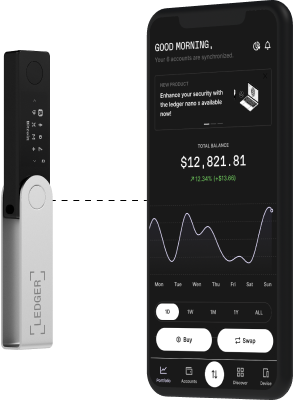
An app
to manage your crypto and access key services: buy, swap or grow your assets. Securely thanks to your hardware wallet.HOW TO STAKE STACKS
01
Buy a Ledger hardware wallet
A Ledger hardware device does two things: it stores your private keys on dedicated offline hardware, and it physically signs every transaction. No action, staking or otherwise, can proceed without your confirmation on the device itself.
02
Set up your device and install the Stacks app
- Connect and unlock your Ledger device.
- Follow the setup steps.
- On Ledger Wallet, go to "My Ledger" and install the Stacks app.
03
Download and create an Hiro wallet
- Head to wallet.hiro.so and install from Chrome Web Store
- Open Hiro Wallet extension and select "I already have a wallet"
- Select "Continue with Ledger"
- Connect your Ledger and enter its PIN on the device
- Open the Stacks app on your Ledger device
04
Start staking Stacks
- Choose the pool that you think best suits your needs. You have the choice between Xverse Pool, Friedger's Pool, Planbetter, InfStones.
- Determine the amount of STX you'd like to commit for Stacking. Enter your BTC reward address, and choose your number of cycles.
- Allow pool contract to interact with your wallet and confirm your STX delegation.
LEDGER LIVE
Other crypto to stake with Ledger

Osmosis*
OSMO
CARDANO
ADA
Solana*
SOL
Kusama
KSM
Avalanche
AVAX
Algorand
ALGO
MANTRA
OM
Tron
TRX
Hedera
HBAR
Axelar
AXL
NEO
NEO
Casper Network
CSPR
EGLD*
EGLD
Polkadot
DOT
NEAR*
NEAR
Mina Protocol
MINA
ATOM*
ATOM
Tezos
XTZ
Ethereum
ETH
dYdX
DYDX
Cronos
CRO
Internet Computer
ICP
EOS
EOS
Oasis Network
ROSE*Ledger validator node available
Want to learn more about staking?
We answer all the basic questions you might have in our Ledger academy: What is staking? What’s
the difference
between Proof-of-Stake and Proof-of-Work? What is a validator?
You can also take a look at our School of Block series on Youtube to learn how to get started in staking
and make your
money work for you.

What is staking
Read the article
School Of Block
See our episode about staking
What is proof of stake
Read the article