
How To Connect Your Ledger Wallet To MetaMask Securely

| KEY TAKEAWAYS: |
| — To retain custody over your crypto assets, you’ll need to use a non-custodial wallet, such as MetaMask or Ledger. However, the security of non-custodial wallets can vary greatly. — Software wallets such as MetaMask remain connected to the internet, whereas Ledger signers, store private keys in an isolated environment. — Software and hardware wallets aren’t in competition; you can use them together for the best user experience while retaining your security. |
If you’re exploring blockchain apps and platforms in the wonderful world of web3, you’ve probably heard about MetaMask.
With its orange fox logo, MetaMask is one of the most popular crypto wallets today, and certainly the most famous hot wallet so far. However, to use MetaMask securely, it’s good practice to use it in combination with a hardware wallet such as a Ledger device.
But before we get there, let’s dive into the basics. In fact, what is MetaMask all about?
What Is MetaMask?
MetaMask is a non-custodial software crypto wallet that operates cross-chain. To explain what that means, let’s break that down.
So firstly, MetaMask is non-custodial: it allows you to control and manage your own private keys. Unlike a bank or a wallet on a crypto exchange, MetaMask does not have any power over the funds in your account. As long as you’re the only one with access to those private keys, you are the sole owner and manager of your account.
Next, it’s cross-chain. MetaMask allows you to manage accounts on multiple networks, including Ethereum, Binance Smart Chain, and Polygon. Specifically, MetaMask supports EVM chains, and may even branch out to other networks in the future.
Finally, it’s a software wallet, also known as a hot wallet. It operates purely via software you download and install on your web2 device, such as a smartphone or laptop. It stores your private keys on that host device, which is very convenient for sending transactions to the blockchain. However, this feature also impacts your security. To understand how you can mitigate this risk, let’s first dive into what MetaMask is for.
What is MetaMask For?
MetaMask was designed for interacting with blockchain apps and smart contracts including DeFi platforms and NFT Marketplaces. To explain, most decentralized applications (dApps) and decentralized finance (DeFi) protocols only support a few different wallets, and often, MetaMask will make that shortlist.
There are countless blockchain apps and platforms you can connect to with MetaMask, with almost too many features and genres to name, but here are a few things you can do using MetaMask:
- Borrow or lend crypto coins or tokens
- Buy, sell, and trade on NFT marketplaces
- Play blockchain games
- Start yield farming
- Trade and swap on Decentralized Exchanges
MetaMask Crypto Wallets: How To Mitigate Risks
But as with any good thing, using MetaMask comes with some risks.
Essentially, software wallets, including MetaMask, generate and protect your private keys on your host device, such as your smartphone or laptop. Unfortunately, your web2 devices are not designed to store private keys, and thus using a crypto wallet on these types of devices may leave you vulnerable to online threats. Since your web2 device connects to the internet and is vulnerable to malware, you can’t always trust its screen. Plus, signing a transaction also poses a risk as your web2 device risks exposing your private keys via your internet connection.
For these reasons, MetaMask also recommends you use a hardware wallet in conjunction with its software wallet if you own a significant amount of crypto. Luckily, you can use your Ledger signer in tandem with your MetaMask wallet to get the best of both worlds. Yes, you can combine the Web3 agility of MetaMask with the offline security of a hardware device.
Why You’d Want To Use MetaMask with Ledger
In general, using a hardware wallet is the most secure way to store the private keys. That’s because they store your private keys and sign transactions offline. This guarantees that no one on the internet can access them. Connecting an account on your Ledger signer with a MetaMask wallet allows you to protect your private keys, sign transactions offline, and still access all of the apps and platforms you want.
Essentially it provides you with a physical U2F. To clarify, you will need to physically connect your Ledger signer to your computer. Then you will have to confirm every transaction on the physical signer each time you initiate it through MetaMask. As you can guess, this makes the hackers’ job quite difficult. This is what makes using the combination of MetaMask and Ledger so secure.
How To Set Up MetaMask To Connect To Ledger
First, get yourself a Ledger signer to safeguard your private keys. Ledger signers come with an all-in-one-crypto app called Ledger Wallet™ (available on mobile & desktop), providing you with a safe gateway to all your crypto services and downloadable for free.
From there, you’ll also need to install MetaMask. You have two options: either you install its browser extension, compatible with Chrome, Firefox, Brave, and Edge, or its mobile app.
Make sure you download the wallet from the official MetaMask website though, as fake wallet apps are well-known scams that could target you.
Once you have those elements sorted, you’re ready to begin. Here’s a step-by-step guide on how to set it up:
- Open Ledger Wallet and Click on “Accounts” on the left-hand side.
- Create your Ethereum account by clicking ‘Add an Ethereum account’
- Open MetaMask to set up a new wallet. Here you’ll then face an important question: create a new wallet or import an existing wallet. Here, opt to create a new wallet. We’ll explain why below.
- Approve the next page: this relates to sharing data with MetaMask.
- Create a password when prompted on the page that follows: this will be your login credential for each time you want to use MetaMask going forward.
- On the next screen, you’ll receive the recovery phrase words for your MetaMask wallet. Once you’ve confirmed that you’ve seen and recorded this phrase, your MetaMask set-up is complete.
Which Seed Phrase (Secret Recovery Phrase) Do I use?
You might be wondering at this point what the difference is between the MetaMask seed phrase and the one you received when you first set up your Ledger signer.
The answer is pretty simple. Each phrase acts as a master key to a separate set of addresses on the blockchain. The difference is that your Ledger seed phrase has never been exposed online, while you can’t say the same for any software wallet seed phrase.
To explain, software wallets generate, store, and manage your seed phrase while connected to the internet. So if you have revealed it to a bad actor, you won’t know until they access your wallet. That’s why it’s always best practice to avoid keeping valuable assets in any wallet storing your keys and seed phrase on an internet-connected device. Instead, you should protect these sensitive pieces of information with your hardware wallet (such as a Ledger signer), and leave all of the interface and connectivity jobs for your software wallet.
So how do we use these two wallets together while benefiting from the best features of both?
How To Connect Your Ledger To MetaMask
With that all clear, let’s walk through the steps of how you can connect Ledger to MetaMask, to enjoy seamless transactions while your keys stay entirely offline.
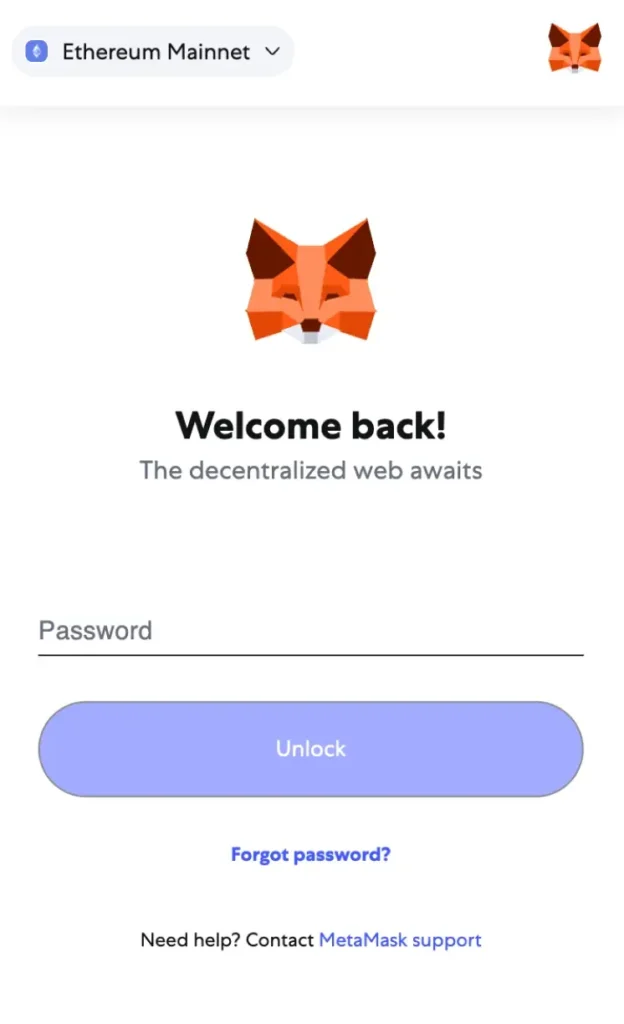
Step 1. Connect your Ledger signer to your computer device using a USB cable. Also, open your MetaMask wallet in full screen on your browser. You can do this by logging in with the password you just set up.
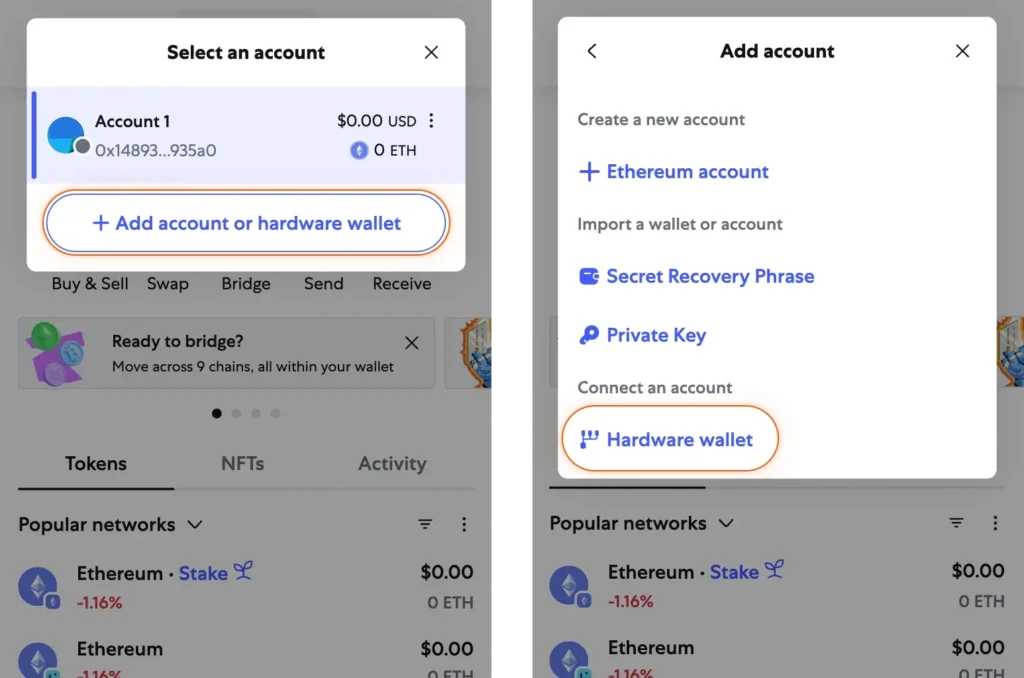
Step 2: Click on the top-right menu of the MetaMask wallet and then find and click on “Connect Hardware Wallet” in the drop-down menu.
Step 3: When you click “Continue,” MetaMask will look for a Ledger signer connected to the computer. So, to make sure it discovers your wallet, unlock your Ledger signer.
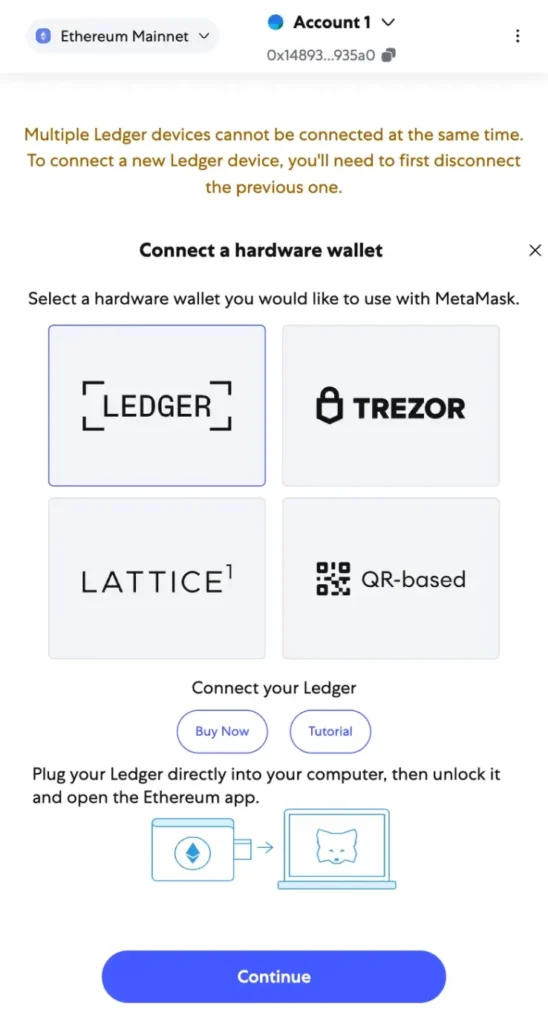
Step 4: Once it discovers your wallet, it will prompt you to choose a Ledger account that you would want to connect to MetaMask. Choose an existing account or create one in Ledger Wallet and choose that.
Step 5: Click on the “Ethereum application” on your device display then click on “settings” and turn on “blind signing” (please make sure you’re aware of the risks associated with blind signing). Or else it won’t work properly.
Step 6: Open the MetaMask window, click on the account logo in the top right corner, scroll down to “settings” and click. Then click “advanced settings”, scroll down, and turn on “WebHID”.
Voila! This will enable you to view your Ledger portfolio balance on your MetaMask extension or mobile app. You will also be able to transact across all blockchain applications that support MetaMask. The only thing you will need is to connect your Ledger signer to your device, open Ledger Wallet, verify and sign the transactions.
Step 7: Enjoy your ride: you can now interact with your favorite dApps with the security of your hardware wallet.
If you’re having any trouble or feel a bit lost, this support page might be of help.
As of 2024, you also have the option to connect your Ledger Nano X to MetaMask Mobile! To learn more and start connecting your wallets for prime ease of use, check out the support page.
MetaMask and Ledger: Accessible and Secure
If you want to explore the wonderful world of web3, you’ll want to do so with style and security. With the MetaMask browser extension or mobile app, you have access to a plethora of blockchain apps and services, including all of the top DeFi platforms, countless NFT marketplaces, and even NFT minting platforms. MetaMask is one of the top most supported wallets in the web3 ecosystem.
Then the Ledger Security model guarantees that its devices and software work seamlessly. Your Ledger signer protects your private keys in an isolated environment, away from your internet connection and the remote attack vector it represents. And of course, their cutting-edge physical components mean Ledger signers are resistant to physical hacks too. In short, your Ledger signer is all about security, and your MetaMask wallet is all about connectivity. The cherry on top is that you can use these wallets together to get the best of both worlds.
So what are you waiting for? Download MetaMask and protect it with your Ledger signer to interact with web3 apps and platforms with self-custody and security on your side.
Knowledge is Power.

The Shift: From Hardware Wallet to signer
Crypto may have begun as a bold experiment, but adoption has grown as the technology and user experience have rapidly evolved; the language used to describe it, has however, stayed stuck in its infancy.
We called our devices “hardware wallets,” mislabelling the role of secure hardware, and obfuscating the role of software (Ledger Live). Along the way, users were left behind.
People believed:
- That value was stored on the device (it isn’t).
- That if you lose the device, you lose your assets (you don’t).
- That the device itself was the endgame (it’s not).
- That those 24 words were a burden only tech-savvy users could manage (not true anymore).
These are more than misconceptions. They are adoption blockers. So at Ledger, we believe that clarity is essential for the next stage of adoption
We’re changing how we speak about our products. And by doing so, we’re changing how people understand digital ownership itself.
Hardware wallets → signers
Ledger devices don’t store value. They sign transactions. They prove intent. They verify identity. They’re not vaults, they’re the secure bridge between who you are and what you do online. They don’t just hold keys. They empower you to trust yourself.
We call them signers now, because that’s what they truly are.
In a world where AI grows more powerful every day, proof of humanity matters more than ever. A signer is more than a security device, it’s your cryptographic proof of you. It gives you a secure foundation to own, authorize, and protect your digital life without relying on anyone else. From sending a transaction to signing a contract or verifying your credentials, your signer ensures you, and only, can provide digital consent – proof of you.Together, signer and Ledger Wallet redefine what digital ownership looks like, clear, secure, and free from compromise.
