



All supported crypto



Stake your Ethereum securely and earn 2–4% APY*
Staking Ethereum lets you earn passive rewards while helping secure the network, all without giving up control of your assets. Most staking platforms take custody of your ETH to stake it on your behalf. Ledger doesn't when you stake through Ledger Wallet. Your Ethereum stays on the blockchain, your private keys stay on your hardware device, and you earn 2–4% APY — without handing control to a third party*.
Stake Ethereum via Ledger Wallet**Disclaimer: Crypto transaction services are provided by third-party providers. Ledger provides no advice or recommendations on use of these third-party services. Rewards and payout frequency are not guaranteed. Ledger does not provide any financial advice or recommendations.

WHY STAKE YOUR ETHEREUM?
Ethereum uses a Proof of Stake consensus mechanism. By staking your Ethereum, you actively contribute to network security and decentralization — and earn rewards in return.
Earn 2–4% APY*
Staking ETH token in your Ethereum wallet with Kiln offers an average return of ~3.5%. Staking ETH with Lido offers an average return of ~3%. This rate may vary depending on different criteria.
*Rewards are not guaranteed. Ledger provides no advice or recommendations on use of staking services.
Stake directly on-chain
By staking via Ledger Wallet*, your ETH participates directly in the Ethereum network. Not through a platform holding your assets on your behalf. You're staking, not lending.
Keep full custody
Your private keys are stored on your Ledger hardware device, not on a platform's server. When you delegate, you sign the transaction on your device. The validator participates in consensus on your behalf — but holds no keys and controls no assets. Your ETH stays on the Ethereum blockchain, associated with your address.
Why stake Ethereum (ETH) via Ledger Wallet
Cold staking security
Your private keys are stored on a dedicated hardware device, offline and physically separate from your computer*. To stake Ethereum, you confirm the transaction directly on your Ledger Signer. No staking action goes through without your physical approval.
Your validator, your choice
On most staking platforms, the platform selects the validator on your behalf. Through Ledger Wallet, you choose. Compare commission rates, uptime history, and track records, then delegate to whichever validator meets your criteria*. Your delegation isn't tied to a single option; you can review and switch as conditions change.
Access the ecosystem on your terms
The Ledger Wallet app connects you to validators, exchanges, and Ethereum services, without locking you into a single provider. Whichever option you choose, the transaction is confirmed on your hardware device. The flexibility of the ecosystem, with hardware-level security on every action.

Stake Ethereum and earn 2–4% APY*
When you delegate your Ethereum to a validator via the Ledger Wallet app, that validator participates in securing the Ethereum blockchain. The Ethereum protocol distributes block rewards to validators in return — a portion of which is passed on to delegators proportional to their stake, minus the validator's commission rate.
The current estimated annual yield for Ethereum staking is approximately 2–4%. This figure varies with network participation levels and your chosen validator's commission. Rewards are credited approximately every 6 minutes. When comparing validators, the key variables are commission rate, uptime history, and total stake. On some networks, an over-staked validator can dilute individual rewards.
You can un-delegate your Ethereum at any time through the Ledger Wallet app. Most networks apply an un-bonding period after un-delegation — a set number of days during which your ETH cannot be transferred and does not accrue rewards. On networks where slashing is active, a validator misbehaving can result in a partial loss of delegated funds: another reason to choose your validator carefully.
Estimate ETH staking rewards
HOW DOES LEDGER'S SOLUTION WORK?
Get your deviceA hardware wallet
that offers the best security for your crypto and NFTs - your assets always remain safe.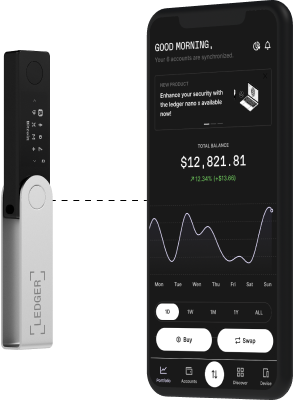
An app
to manage your crypto and access key services: buy, swap or grow your assets. Securely thanks to your hardware wallet.Grow your ETH through Ledger
01
Buy and set up your hardware wallet
A Ledger hardware device does two things: it stores your private keys on dedicated offline hardware, and it physically signs every transaction. No action, staking or otherwise, can proceed without your confirmation on the device itself.
02
Download the Ledger Wallet app
The Ledger Wallet app is your gateway to the Ethereum ecosystem: exchanges, validators, DeFi protocols and more. Buy, stake, swap, and manage your crypto across multiple providers, from Kraken to 1inch.* Download it free on desktop or mobile.
03
Set up your device
Follow the setup steps in the Ledger Wallet app and create a Ethereum account on your device.
04
Buy or transfer Ethereum to your account
Transfer your existing ETH to your Ledger account, or buy via the Ledger Wallet app. Keep a small amount aside to cover network transaction fees.
05
Start staking ETH
In the Ledger Wallet app, go to your Ethereum account and click "Earn rewards". Enter your staking amount, choose a validator and confirm the transaction directly on your physical Ledger signer. Your keys do not leave the hardware*.
LEDGER LIVE
Other crypto to stake with Ledger

Internet Computer
ICP
dYdX
DYDX
Algorand
ALGO
CARDANO
ADA
EGLD*
EGLD
EOS
EOS
NEAR*
NEAR
ATOM*
ATOM
MANTRA
OM
Tron
TRX
Tezos
XTZ
Hedera
HBAR
NEO
NEO
Oasis Network
ROSE
Osmosis*
OSMO
Stacks
STX
Casper Network
CSPR
Axelar
AXL
Mina Protocol
MINA
Solana*
SOL
Kusama
KSM
Polkadot
DOT
Cronos
CRO
Avalanche
AVAX*Ledger validator node available
Want to learn more about staking?
We answer all the basic questions you might have in our Ledger academy: What is staking? What’s
the difference
between Proof-of-Stake and Proof-of-Work? What is a validator?
You can also take a look at our School of Block series on Youtube to learn how to get started in staking
and make your
money work for you.

What is staking
Read the article
School Of Block
See our episode about staking
What is proof of stake
Read the article